Cold outreach: what it is, how to run it and what to send
The channels, a step-by-step way to run it, five messages to copy, the rules that keep your accounts healthy and how to tell whether it's working.
On this page 8 sections
Quick answer: Cold outreach is contacting a potential customer, partner or investor who doesn't know you yet, usually by email or LinkedIn and sometimes by phone. It works when each message is short, written for one person and tied to a real reason to write now. Send from your own accounts at a human pace, follow up a few times with something new and stop the moment someone replies.
Every customer you have started as a stranger. Cold outreach is how you reach the next ones on purpose instead of waiting to be found: you pick the people, find a reason to write and start the conversation yourself.
Below, in order: the channels, seven steps, five messages to copy, the rules that keep your accounts in good standing and how to tell whether it's working.
What cold outreach is
Cold outreach is the first message to someone who has never heard from you: no form they filled in, no introduction, no earlier conversation. In B2B sales it usually means a short email or LinkedIn message that asks for a reply, a call or permission to send something useful.
Cold doesn't have to mean random. Outreach sits on a scale:
- Cold: they fit your buyer and that is all you know. Nothing says this week is a good week.
- Warmer: they fit and something recent gives you a reason to write. They posted about the problem you solve, started a new role or their company raised money.
- Warm: they already know you. They follow you, reacted to your posts or someone introduced you.
The more specific your reason to write, the less cold the message reads. That is why most of the work happens before you write anything.
The channels: email, LinkedIn and phone
| Channel | Good for | What it needs | First message |
|---|---|---|---|
| Room for context and a link; people who rarely open LinkedIn | A verified work address and a warmed mailbox on an authenticated domain | 50 to 120 words with one ask | |
| A face and a profile behind your name; people active on LinkedIn | A complete profile and invitations paced within LinkedIn's limits | A note under 200 characters, then a message under 60 words once they accept | |
| Phone | A quick yes or no from people who take calls | A direct number and a sensible time | Thirty seconds on why you called, then a question |
They work best together. An invitation on LinkedIn makes your name familiar, so the email a few days later doesn't arrive from a stranger. For LinkedIn on its own, see how to write a LinkedIn cold message and 27 connection notes by situation.
How to run cold outreach, step by step
Name your buyer
Write down the role, the company size and the problem you solve for them, in their words. "Heads of sales at software companies with 20 to 200 people who don't trust their forecast" is a buyer. "B2B companies" is not. If you're unsure, start from your own site: how to write an ICP from your website.
Find a reason to write now
Look for something that changed: a new role, a post about the problem you solve, a team they're hiring, fresh funding, interest in a competitor. A reason from this week beats one from last year. Sales signals covers the kinds that matter; trigger events covers how long each window stays open.
Build a short list with contact details
Start with 50 to 100 people who fit your buyer and have a reason. For each, note the reason, the LinkedIn profile and a verified work email; our LinkedIn email finder guide shows how.
Write the first message
One person, one reason, one ask. Open with the reason, say in a line why it matters to them and end with a question that is easy to answer. Leave your company history, a list of features and your calendar link for later.
Plan the follow-ups
Three to five touches over two to three weeks, across LinkedIn and email. Leave at least three days between messages. Each follow-up adds something new: a resource, a sharper question or a different angle. The last one closes the loop politely.
Send at a human pace
Send from your own LinkedIn account and mailbox, a few at a time through the working day. Ramp a new account up over weeks rather than days.
Answer fast and stop the sequence
When someone replies, stop everything else queued for them, answer what they asked and offer one easy next step, such as a short call or the resource. What to say next is in how to turn LinkedIn replies into booked calls.
Example cold outreach messages
Five messages for one sequence, each built on a reason to write. Swap the brackets for real details. If you can't fill a bracket with something true, don't send that message.
LinkedIn note after a post
[Name], your post on [topic] made a point I keep coming back to: [their point, in a few words]. I work with [role]s on the same problem. Happy to connect.
- Length
- Keep it under 200 characters once filled; here is why 200 is the safe length.
- When
- They posted or commented on the problem you solve in the last two weeks.
- Why it works
- It proves you read the post and asks for nothing but the connection.
LinkedIn message after they accept
Thanks for connecting, [Name]. Your point about [topic] is why I reached out: most [role]s I speak with [the problem, in their words]. We help teams like [Company] [outcome]. Is that on your list this quarter?
- Length
- About 40 words; keep a first LinkedIn message under 60.
- When
- The day after they accept your invitation.
- Why it works
- It carries the reason forward from the note and ends on a question they can answer in a word.
First email after a company signal
Subject: [Company]'s new [team] hires
Hi [Name],
Saw that [Company] is hiring [number] [role]s. Teams growing that fast usually run into [problem] around [stage].
We help [type of company] [outcome] without [the cost or pain they want to avoid].
Would a one-page summary of how [a team like yours] handled it be useful?
[Your name]
- Length
- About 50 words.
- When
- A company signal: hiring, fresh funding or a new leader.
- Why it works
- The subject and first line are about them and the ask is a yes to something useful, not a meeting.
Follow-up with something new
Subject: sent in the same thread as your first email
Hi [Name],
One more thing on [problem]: [a short, specific finding or resource, in one sentence]. Here it is if useful: [link].
If [problem] isn't yours to solve, who on your team owns it?
[Your name]
- Length
- About 40 words.
- When
- Three or more days after the first email, with no reply.
- Why it works
- It gives before it asks again and offers an easy way out: pointing you to the right person.
Closing the loop
Hi [Name],
I'll stop here so I'm not crowding your inbox. If [problem] comes up later this year, reply to this email and I'll send what we have.
Thanks for reading,
[Your name]
- Length
- About 35 words.
- When
- The last step, about a week after the follow-up.
- Why it works
- It ends politely and leaves the door open, so the next conversation starts warm.
More versions: sixteen emails in cold email templates and twelve LinkedIn messages in LinkedIn cold message examples.
The rules that keep a sender out of trouble
Cold outreach stays welcome when it looks like what it is: one person writing to another about their work. These rules keep your accounts, your domain and your name in good standing:
- Use your own accounts and ramp up slowly. A new LinkedIn account or mailbox starts with a handful of sends a day and grows over weeks. How many invitations a LinkedIn account can send is covered in LinkedIn connection limits.
- Authenticate your domain. Under Google's email sender guidelines, every sender must set up SPF or DKIM for the sending domain and keep the spam rate reported in Postmaster Tools below 0.3%.
- Send only to verified addresses. Each bounce tells mailbox providers you don't know who you're writing to. Verify close to the day you send.
- Be honest in the subject and the sender. Your real name, your real company and a subject line that matches the email. No fake "Re:" on a first message.
- Stop on a reply and keep every no. A reply ends the sequence. "No thanks" or "please stop" means never again, so keep a block list.
- Don't make people feel watched. Refer to the topic, the company or the moment, never "I saw you liked my post". More rules in this spirit are in what an AI outbound agent should never do.
- Know the law where your buyers are. In the US, commercial email falls under the CAN-SPAM Act, which the FTC's compliance guide says makes no exception for business-to-business email. The EU's GDPR and the UK's PECR set their own rules, so read the guidance for each country you write to.
How to judge cold outreach
Judge it on conversations, not activity. For every 100 people you contact, track:
- Invitations accepted: on LinkedIn, whether your note and profile earn a yes.
- Replies: any answer at all, a no included.
- Positive replies: people who want to talk or want the resource.
- Meetings booked and held: the number that pays the bills.
- Pipeline: what those meetings turn into over the next quarter.
Change one thing at a time and give each version about 100 people before you decide. Track results by reason for writing too: if new-role messages book meetings and funding messages don't, you know where next week's effort goes. Each week, glance at the health numbers as well: bounces, spam complaints in Google Postmaster Tools and invitations still pending after a few weeks.
Where warm outbound from buying signals fits
The hardest part of cold outreach is step two: a real reason to write to each person, every week, for every name on the list. That is the part FOUND takes over. It is an AI SDR for LinkedIn and email that watches for buying signals and writes to the people who show them, so most of your outreach starts warm. It serves any company selling to other businesses, from a founder selling alone to a full sales team with a seat for every rep.
- Your buyer
- Type your website and FOUND drafts a brief of what you sell and who buys it; you change a line or two. Two agents each get their own buyer, up to 15 signals and a campaign of their own. An extra agent is $39 a month.
- The reason
- Seven kinds of buying signal, checked daily: new roles, fresh funding, posts on the problem you solve, hiring for the team you sell to, interest in a competitor's posts, your market's topics or your page and, on Premium, profile viewers. Each person goes through two checks against your buyer and every lead shows why it was picked.
- The list and emails
- Leads arrive from the first day. Ask adds up to 50 companies from one sentence, each with a contact and their email. Each verified work email takes one credit from the 100 included every month; misses aren't charged.
- The messages
- Sequences of up to 8 steps combine a LinkedIn invitation (with a note on Premium), LinkedIn messages and emails from your own mailbox. Each is written from that person's reason, in your tone.
- The pace
- In review mode you approve each invitation, message and email; turn on autopilot when you trust it. A new account waits 48 hours, starts at 35 invitations a week and climbs to 125 a week after two clean weeks, with 25 a day as the ceiling. Email warms up to 60 a day.
- The replies
- Both channels reply into one inbox with drafts ready. Switch on the reply agent for a conversation and it replies, sends your meeting link to anyone interested and leaves you whatever it can't promise. Any reply stops that person's sequence.
- Also
- Claude, ChatGPT and any MCP client can use it through 18 tools that read, draft and prepare; sending never happens from chat. CSV import and export, webhooks and a Slack alert on each reply come with it.
- Price
- $69 a month covers two agents and 100 credits, one LinkedIn account and one mailbox; each teammate is $59 a month. Messages start on day three. Before you pay, you see real leads for your own buyer.
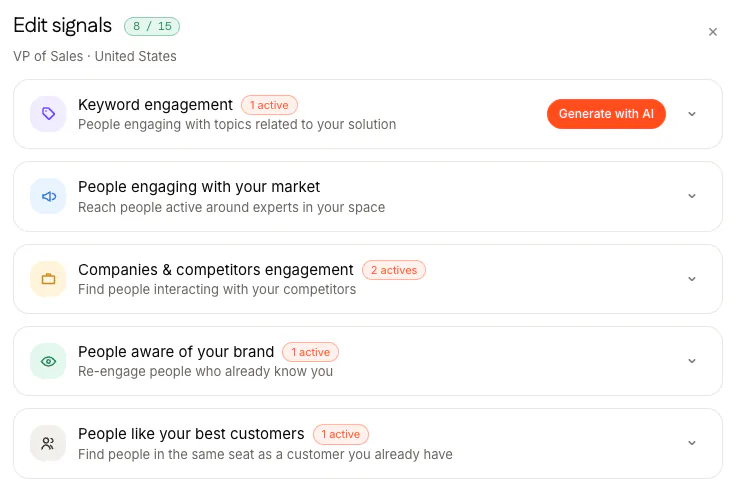
See what it would send in your market in a demo or start from the pricing page. The seven signals and the first line each one leads to are in LinkedIn buying signals.
Questions
What is cold outreach?
Contacting someone who doesn't know you yet, usually a potential customer, by email, LinkedIn or phone, to start a conversation. In B2B sales it is usually a short message about their work with one easy ask.
What is the difference between cold and warm outreach?
Cold outreach goes to someone with no prior contact and no recent reason to hear from you. Warm outreach goes to someone who already knows you or who just did something that makes your message timely, like starting a new role or writing a post about the problem you solve.
How many follow-ups should cold outreach have?
Three to five touches over two to three weeks is a sensible shape: a first message, one or two follow-ups that each add something new and a short last note. Leave at least three days between messages and stop as soon as they reply.
Is cold email still effective in 2026?
Yes, when it is specific: written to one person, for a reason that applies to them now, from a warmed mailbox on an authenticated domain.
Is cold outreach legal?
In most places, yes, when you follow the local rules. In the US, commercial email falls under the CAN-SPAM Act, which the FTC says makes no exception for business-to-business email. The EU and UK have their own rules. Write about the person's work, be honest about who you are and stop when asked.