Ask ChatGPT who is showing buying intent, what's new at an account and what to say to them. Your FOUND agent does the sending, from your own account, at a safe pace.
Added in ChatGPT's developer mode, on the Plus, Pro, Business, Enterprise and Edu plans
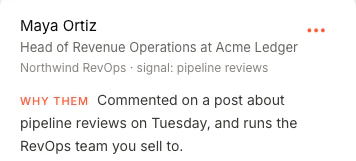
Who's my best lead this week? Draft them an opener.
FOUND · find_leadsdraft_message
Draft for Maya Not sent
Illustration: the rows are real FOUND data from a sample workspace; the question and the tool call are drawn.
Setup
Add it once. Then just ask.
FOUND isn't in ChatGPT's app directory, so you add it yourself in developer mode: ChatGPT's setting for adding your own connectors. Five steps, no code and no key to paste.
ChatGPT developer modeOne addressSign in and AllowYour FOUND account
The address One address for every assistant. You sign in and click Allow; no key to paste.https://app.foundtofind.com/mcp
No FOUND account yet? Start your agent first, so ChatGPT has a pipeline to read. You see real leads for your own buyer before you pay.
01 · ChatGPT
Turn on developer mode
Open Settings → Security and login and turn on Developer mode. Business, Enterprise and Edu workspaces need an admin to allow it first.
ChatGPT talks to FOUND, never to your accounts. Everything it prepares waits in FOUND, and goes out only through the same limits your agent lives by.
You askChatGPTIn developer mode, on your own plan
Signed in, allowed by youFOUND connectorReads, drafts and prepares. Up to 30 requests a minute per account.
Your accountYour agentsLeads, lists, drafts, paused campaigns and numbers
Everything passesThe gateYou switch it on · planner · pacing · limits · block list
Your accountsLinkedIn and mailboxIn your daily window, at your pace
Nothing ChatGPT prepares reaches your LinkedIn or mailbox until you switch the campaign on in FOUND. Campaigns it creates start paused, and it can change a campaign's messages or sources only while it's paused.
What to ask
Questions worth asking your pipeline.
Each one maps to a FOUND tool, shown on the card. None of them sends anything.
Prioritiseprioritise_accounts
Accounts heating up
Which accounts showed new buying signals this week? Rank them and say who we already have there.
Reads only Companies ranked by new signals, newest and strongest first, with the people FOUND has there and whether they've been contacted.
Personalisedraft_message
Write from their reason
Write Priya Nair an opener that starts from her post about hiring account executives.
Draft only The message FOUND would send her, from why she was found and your own offer. Nothing is queued or sent.
Analysepipeline_breakdown
Find what's working
Which job titles and company sizes replied most in the last 30 days?
Reads only Your results split by the segment you ask for, with reply and acceptance rates. The groups add up to your Dashboard's numbers.
Researchresearch_account
Brief me before the call
I'm meeting Brightline Labs tomorrow. Give me three talking points from what FOUND knows.
Reads only Only what FOUND already holds: the company, its hiring or funding news, the people you have there, their signals and your conversations.
Find a contactfind_contact_at_company
Company in, person out
Find the head of sales at Brightline Labs, with their work email.
Credits, price first 2 credits, 3 with the email, shown before it runs; ChatGPT asks you first. The result lands in a new FOUND list a few minutes later.
Diagnosecompare_campaigns
The weakest step
Compare reply rates across my last three campaigns and point out the weakest step.
Reads only Reply and acceptance rates side by side, and the message step with the lowest reply rate.
Sequenceupdate_sequence
Rewrite a paused campaign
My Fintech campaign is paused. Rewrite its second message to open with their hiring news.
Paused only Saved to the paused campaign's sequence. Nothing goes out until you switch it on in FOUND; a running campaign can't be changed from chat.
Reportcampaign_report
The weekly report
Give me this week's report for my RevOps campaign against last week.
Reads only Found, contacted, accepted and replied against the week before, the signals that found the most people, and which step got the replies.
Statusconnect_status
Check before you push
Is my LinkedIn account healthy, and how many credits and searches do I have left today?
Reads only Your plan, your account and mailbox, today's invitations against the cap, your campaigns, credits and searches left today.
Before you connect it
Reads, drafts and prepares. Never sends.
ChatGPT can look, draft and set things up. Only your agent sends, only once you switch a campaign on, and only inside its limits.
It can
Find your warm leads and answer questions about your pipeline
Find new companies and contacts from a sentence (it shows the credits first)
Research an account
Draft messages
Build lists and add them to a paused campaign
Create a paused campaign or change a paused campaign's messages
It will never
Send anything itself
Switch a campaign on
Change the messages or sources of a running campaign
Approve a message
Change a limit, the pacing or review mode
Connect or disconnect an account
Delete anything
Spend a credit without showing the price first
Whatever it adds goes through the same planner, pacing, limits, block list and opt-outs as everything else.
After the chat
What happens after you ask.
ChatGPT lines up the right people. Your agent takes it from there, and it ends when they choose a time on your booking link.
You ask in ChatGPT
Rank, research, draft. Then set up a paused campaign and switch it on in FOUND.
Your agent writes, paced
From your own LinkedIn and inbox, inside your window. With Book demos as your goal, every message steers toward a short call.
A reply stops the sequence
It lands in one inbox and, with AI draft replies on, an answer drafted for it offers your booking link when they're interested.
Or the agent answers Off by default
On threads you switch on, it replies at a human pace and hands back what it can't answer.
They pick a time on your link
On your own booking tool. FOUND never reads or writes your calendar.
Included in your $69 a month. Finding new companies, contacts or a work email spends credits, and ChatGPT shows the price before it runs.
Which ChatGPT plans work, and where is developer mode?
ChatGPT's Plus, Pro, Business, Enterprise and Edu plans, on chatgpt.com. Developer mode is in Settings, under Security and login. Business, Enterprise and Edu workspaces need an admin to allow it first.
Why keep Authentication on OAuth?
Because that's how FOUND connects: ChatGPT opens FOUND's page, you sign in and click Allow, and ChatGPT gets its own access to your account. There's no key to paste, and no password is ever passed to it.
To cut it off, open Settings, then Connect, in FOUND, and click Disconnect next to ChatGPT. It stops working in ChatGPT at once.
What does it cost?
Nothing on top of your plan: the connector is part of FOUND's $69 a month. Reading your leads and numbers, researching accounts, drafting and setting up paused campaigns is included.
Two things spend credits, and each shows the price before it runs: finding new companies and contacts (1 credit per company, 1 per contact, 1 per email if you ask for emails) and finding a lead's work email (1 credit, only if an address is found).
Can ChatGPT send messages for me?
No. None of its FOUND tools sends a message, an invitation or an email, and none can switch a campaign on. Campaigns it creates start paused, and it can change a campaign's messages or sources only while it's paused.
Once you switch a campaign on in FOUND, your agent sends at its own pace, through every limit and your block list. With review mode on, each message waits for your approval in FOUND.
Is FOUND in ChatGPT's app directory?
Not yet. You add it yourself in developer mode, which is the five steps above. This answer changes the day that does.
Somebody is asking for what you sell this week.
FOUND spots them from what they do on LinkedIn, writes to them from your own account, and hands the interested ones your booking link.