Founding price while we launch

Your AI agent finds people ready to buy and starts the conversation.

Enter your website. FOUND learns what you sell, watches LinkedIn for the people showing buying intent this week, and writes to them from your own LinkedIn and inbox.Enter your website. FOUND finds people showing buying intent this week and writes to them from your LinkedIn and inbox.

  • See your first real leads before you pay
  • $69/mo founding
  • Cancel any time
  • $69/mo
  • Leads before you pay
  • Cancel any time

or get a demo

FOUND's Copilot screen: Maya Ortiz, Head of Revenue Operations, found because she commented on a post about pipeline reviews, with the invitation the agent will send once you approve.

1/5 · Who and whyReal FOUND screens · sample workspace · 24 Sep 2026Real FOUND screens · sample workspace · 24 Sep 2026

  • Runs on your own LinkedIn and inbox
  • A dedicated residential IP for your account
  • Nothing sends until you switch it on, and review mode holds every message
  • 7 signal families
  • 125 invitations a week, once warmed
  • 60 emails a day, once warmed
  • 35 invitations a week to start
How it finds them

Cold lists are dead. Your agent watches for intent instead.

Most outbound tools sell you a database and let you spray it. FOUND watches seven kinds of buying signal, checks everyone against your ideal buyer, and only then writes.

01 SIGNAL01 / 05

It finds who is warm this week

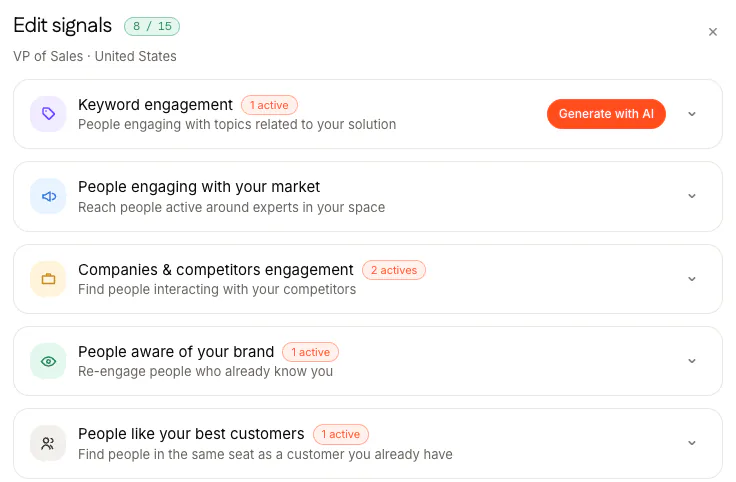
People reacting to posts on your topic or a competitor's, following the voices your market listens to, or already engaging with you. Plus buying events: fresh funding, hiring, a buyer new in the role, a company using a tool you pick.
Keyword engagementCompetitor engagementYour marketYour brandLookalikesFunding and hiringNew in roleTech stack
The Edit signals window for an agent aimed at VPs of Sales in the United States, 8 of 15 signals in use: keyword engagement, people engaging with your market, companies and competitors engagement, people aware of your brand, and people like your best customers.
Edit signals: seven families, up to 15 signals for each agent. Two more families, buying events and tool users, sit below.
02 FILTER02 / 05

Then it throws most of them away

A signal is loud, not accurate. Everyone it surfaces is checked against your ideal buyer twice: first on the headline, then on a full profile read with a scored judgement. Every lead that survives carries the reason it is there.

Job rolesIndustriesCompany sizeLocationsExclusions
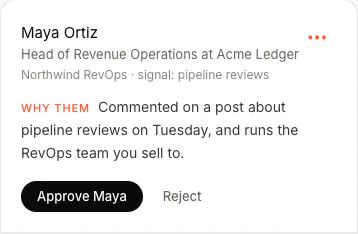
A lead in Copilot: Maya Ortiz, Head of Revenue Operations at Acme Ledger. Why them: commented on a post about pipeline reviews on Tuesday, and runs the RevOps team you sell to. Buttons: Approve Maya, Reject.
Who, why, and your call. From the Copilot review queue.
03 WRITE03 / 05

It writes like you, not like a robot

Each message is built from their profile, the signal that found them and your own positioning. It says why they are interesting without ever saying “I saw you liked my post”. A message with a blank it could not fill is held back, never sent.

Your toneAI templatesFull AIFixed copy
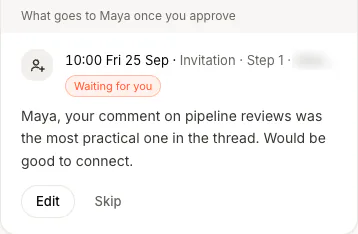
What goes to Maya once you approve: an invitation at 10:00 on Friday 25 September, waiting for you. Maya, your comment on pipeline reviews was the most practical one in the thread. Would be good to connect.
The invitation Maya gets once you approve, word for word.
04 SEND04 / 05

Paced so your account stays safe

A new account starts at 35 invitations a week and earns its way to 125, one step at a time, each after two clean weeks, and never sends more than 25 in a day. Mailboxes warm up from 20 emails a day to 60. Sends land inside a daily window at irregular gaps, never on a robotic tick.

35 to 125 a week20 to 60 emails a daySteps down if LinkedIn pushes back
Invitations a weekas a new account ages
3570100125 Week 0246
Each step needs two weeks with no failed sendsNever more than 25 a day, Monday to Friday
The product's own pacing rules, drawn as a chart.
05 BOOK05 / 05

It stops at yes and hands them your link

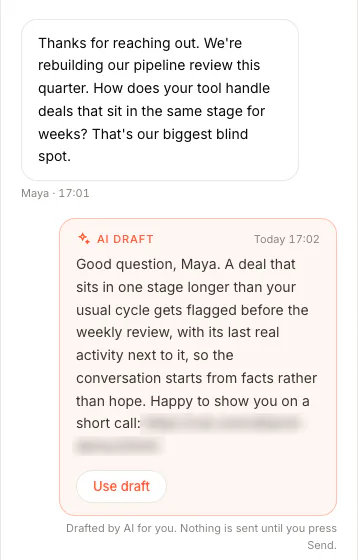
A reply stops the sequence for that person and lands in one inbox. Turn on AI draft replies and each one arrives with an answer ready, offering your booking link when they are interested. Or switch the agent on for a thread and it answers them itself; it is off by default.

Start my agent Leads before you pay, $69/mo
The Inbox: Maya replied asking how the tool handles deals stuck in one stage. Below it, an AI draft answers her question and offers a short call with a booking link, with a Use draft button. Drafted by AI for you; nothing is sent until you press Send.
They pick a slot on your own booking tool. FOUND never touches your calendar.
How it works

Paste your website. Meet your first buyers before you pay.

Three steps, and the one that costs money comes after you have seen the people.

  1. 01Two minutes

    Paste your website

    It reads your site and fills in what you sell, who buys it and the words your buyers use, then proposes your ideal buyer and the signals worth watching. You correct anything before it goes further.

    If it cannot read your site, the fields stay blank and it says why. It never guesses what you sell.
  2. 02Before you pay

    Connect LinkedIn and see your first leads

    The agent scans for about two minutes and shows you real people scored against your buyer, and the first message it would send the top one. You pay after this screen, not before.

    Your LinkedIn password passes through our server once, straight to our connection provider, and is never stored or logged.
  3. 03The outcome

    They pick a time on your link

    Choose Book demos as your goal and add your booking link in Settings. Messages aim for a short call, and with AI draft replies on, the answer drafted for someone interested offers your link. On threads where you switch it on (it is off by default), the agent answers and offers it itself.

    When the agent answers, it hands back anything it cannot answer.
Leads today, messages from day three.A newly connected account only sources for its first 48 hours. It protects the account.
In the box

Everything from signal to reply, in one agent.

From finding someone to them picking a time on your link.

Sourcing

Two agents, around the clock

Each with its own buyer and up to 15 signals. Each runs one of its signals every six hours, taking them in turn, and the app shows when each runs next.

Scoring

Ranked by fit, with the reason

Every lead gets a fit score against your buyer and the line that explains why it is there. The strongest are contacted first.

Multichannel

LinkedIn and email, one sequence

Invitation, message, profile visit and email in up to eight steps. Follow-ups count from when they accept, not from when you sent.

Control

You choose: it runs, or it asks first

Review mode holds every invitation and message for your OK. Autopilot shows the whole next window and lets you edit or skip any of it. Pause a signal, an agent or everything at once.

Replies

Drafted and waiting

Every reply lands in one inbox for LinkedIn and email. Turn on AI draft replies and each waits with an answer ready. Or the agent answers: off until you turn it on, thread by thread.

Ask

Describe who you want in one sentence

FOUND finds the companies and a person at each. 1 credit per company plus 1 per contact, shown before it runs; up to 5 Asks a day.

Works withLinkedInGmailOutlookAny IMAP mailboxCSV importsClaudeChatGPTAny MCP clientWebhooksSlack alertsCSV export

Claude, ChatGPT and any MCP client

Run it from Claude or ChatGPT.

Add FOUND's address to your assistant, sign in and click Allow. Then ask for this week's warm leads, research an account, draft an opener or check your numbers in the chat you already use, and set up paused campaigns that wait for you in FOUND.

  • 18 tools that read, draft and prepare. It can never send.
  • Campaigns it creates start paused. Only you switch them on, in FOUND.
  • Anything that spends credits shows the price first. Included in $69 a month.

ClaudeChatGPTCursor and any MCP client

In ClaudeIllustration

Who are my warmest leads this week, and why is each one there?

FOUND · find_leadsReads only
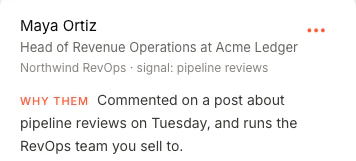
Maya Ortiz, Head of Revenue Operations at Acme Ledger, found by the pipeline reviews signal. Why them: commented on a post about pipeline reviews on Tuesday, and runs the RevOps team you sell to.
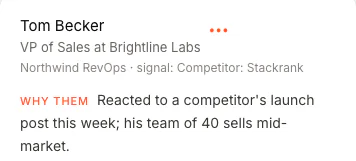
Tom Becker, VP of Sales at Brightline Labs, found by a competitor signal. Why them: reacted to a competitor's launch post this week; his team of 40 sells mid-market.
Illustration: the rows are real FOUND data from a sample workspace; the question and the tool call are drawn.

Five tools you stop paying for.

The usual outbound stack is a lead database, an intent tool, a sequencer, an email finder and your evenings. They do not talk to each other. FOUND runs the whole loop.

  • A lead database
  • An intent-signal tool
  • A sequencer
  • An email finder
  • Hours of copywriting every week

What you run instead

  • Signals, scored and filtered
  • A message written for each person
  • Sending, paced and warmed
  • Replies in one inbox, drafted
  • 100 credits a month, for emails and Ask
All of it$69/mo
Pricing

One price. The whole agent.

$69 a month at the founding price. You see real leads for your own buyer before you pay anything.

FOUNDFounding price
$69a month

For founders and operators running their own outbound.

Start my agent
  • Leads today, messages from day three
  • Cancel any time
  • Two agentseach with its own buyer and up to 15 signals
  • One LinkedIn account and one mailboxpaced and warmed, shared by both agents
  • Up to 125 invitations a week and 60 emails a dayat full warm-up; invitations go out Monday to Friday, never more than 25 a day
  • Sequences of up to 8 steps across LinkedIn and email
  • One inbox for LinkedIn and email, with drafted replies
  • The agent that answers replies, off by defaultyou switch it on thread by thread
  • Ask, and 100 credits a montha credit is one verified work email, or one company or contact from Ask; the cost is shown before it runs
  • Webhooks, a Slack alert on each reply, and CSV exportunder Settings, Integrations
  • Use it from Claude, ChatGPT or any MCP client18 tools that read, draft and prepare; nothing sends from chat
  • Email supporthello@foundtofind.com

Add when you need it: an extra agent, $59/mo · an extra LinkedIn account or mailbox, $29/mo · credit packs of 100, 500 or 2,000 credits.

What happens when you start

  1. Before you pay. Sign in with Google and paste your website. It drafts your buyer and your signals.
  2. Before you pay. Connect LinkedIn. In about two minutes you see real people for your buyer and the first message it would send.
  3. Day one. Leads arrive. Messages start on day three.
  4. Any time. Cancel in Settings, no call or email needed. Your agents keep running to the end of the month you paid for.

Running a team or an agency?

Every LinkedIn account gets its own agent and its own safe pace, all on one bill. For example, three LinkedIn accounts and one mailbox:

FOUNDtwo agents, one LinkedIn account, one mailbox
$69
A third agent
$59
Two more LinkedIn accounts$29 each
$58
A month, one bill
$186

One login for now: team logins aren't built yet. We add the extra agents and accounts with you on a 20-minute call.

Get a demo
Questions

Questions people actually ask.

Straight answers. Anything else, write to hello@foundtofind.com.

All questions
Can I see it working before I pay?

Yes. Sign in with Google, paste your website and connect LinkedIn. The agent scans for about two minutes and shows you the real people it found for your buyer and the first message it would send the top one. You decide after that screen.

Sometimes fewer than five people come back. That tells you something about your buyer, and you still haven't paid. You can also talk to us for 20 minutes.

Is my LinkedIn account safe?

Safety is what the pacing is built around. Your account gets its own residential IP in the country you choose. A new account starts at 35 invitations a week and moves up one step at a time, each after two clean weeks, to 125, never more than 25 in a day, Monday to Friday. Actions are spread through a daily window at irregular gaps, the limits are enforced in code, and if LinkedIn pushes back the agent steps down and waits.

Nobody can promise LinkedIn will never act on an account, and we don't.

Does FOUND store my LinkedIn password?

No. You sign in on FOUND's own page. Your password passes through our server once, straight to our LinkedIn connection provider, and is never stored or logged. After that we hold only a reference to the connected account.

How do meetings get booked?

Choose Book demos as your goal and add your booking link in Settings. When someone replies with interest, the answer FOUND drafts (with AI draft replies on) offers your link, or, on threads where you switch it on (it is off by default), the agent answers and offers it itself. The prospect picks a free slot on your own booking tool. FOUND never reads or writes your calendar.

What is Ask?

Describe the companies you want in one sentence and FOUND finds them and a person at each, checking every company against what you sell. It costs 1 credit per company plus 1 per contact, shown before it runs, with up to 5 Asks a day and 50 companies per Ask.

What counts as a buying signal?

Someone reacting to posts about the problem you solve or to a competitor's posts, someone engaging with the voices your market follows or with you, a company that just raised or started hiring, a buyer new in the role, and companies using a tool you pick.

Why don't messages go out on day one?

A newly connected account only sources for its first 48 hours. You get leads today and messages from day three, which protects the account while you check the leads.

Can I approve everything before it sends?

Yes. Review mode holds every invitation and message until you approve it. Autopilot sends what is queued without asking each time, and shows you the whole next window so you can edit or skip any of it.

Can I cancel?

Yes, any time, in Settings: cancel the subscription, then confirm. Nothing more is charged, and your agents keep running to the end of the month you already paid for.

Somebody is asking for what you sell this week.

FOUND spots them from what they do on LinkedIn, writes to them from your own account, and hands the interested ones your booking link.

  • See your first real leads before you pay
  • $69/mo founding
  • Cancel any time
  • $69/mo
  • Leads before you pay
  • Cancel any time

or get a demo