LinkedIn buying signals: the seven FOUND watches, and what to say for each
What each kind of signal catches, how it's checked against your buyer, and the exact words the first message builds on, from the product itself.
On this page 6 sections
A buying signal is something a person, or their company, does that makes this week a better time to write to them than last month. They react to a post about the problem you solve. They follow a competitor. They start a new job. Their company raises money.
On its own, a signal is loud, not accurate: most people who react to a post will never buy from you. What makes signals useful is the filter after them and the words you use when you write. So this guide sets out all seven families FOUND watches, what each one catches, how it is checked against your buyer, and the line the first message is built on, word for word from the product.

Real FOUND screen · sample workspace · Sep 2026The Edit signals window, all seven families · 10 seconds, no sound
Why a signal beats a list
A list answers "who fits?". A signal answers "who is paying attention right now?". You need both, in that order: the signal finds someone, and the filter decides whether they're worth a message.
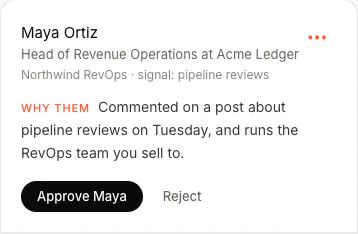
FOUND checks everyone a signal surfaces against your buyer twice: first on their headline, then with a full read of their profile and a scored judgement. The people who pass become leads, and each one carries the reason it was found, in plain words. For everyone the filter drops, it records why.
The seven at a glance
The names are the ones you'll see in FOUND's Edit signals window. Each agent runs up to 15 signals across them.
| Family | What it catches | The reason on the lead |
|---|---|---|
| 1. Keyword engagement | People engaging with posts on topics your buyers care about | Engaged with a post about "pipeline reviews" |
| 2. People engaging with your market | People engaging with the experts your buyers follow | Engaged with a post by the expert you named |
| 3. Companies & competitors engagement | People interacting with a competitor's company page | Engaged with the competitor's content |
| 4. People aware of your brand | People reacting to your posts, and your new followers | Engaged with your content · Follows you |
| 5. People like your best customers | People in the same seat as a customer you already have | Lookalike: similar to your customer |
| 6. Buying events | Top-active people in your buyer's role, fresh funding, new jobs, hiring | Just raised · Just hired (<90d) · Hiring · Top active in your ICP |
| 7. Companies using a tool | Teams that run, or are hiring for, a tool you work with | Runs the tool · Hiring for the tool |
The seven, one by one
For each: what it catches, how FOUND reads it, and the half-sentence the first message is built on. That half-sentence is written by rules, not by a model, so it never drifts into something creepy.
Keyword engagement
People reacting to or commenting on posts about a topic your buyers care about, and the people writing those posts. You give it topics, or press Generate with AI for suggestions. Each run it ranks the posts on each topic from the last 14 days by engagement, with a comment worth three reactions, and reads who engaged with the top three.
- On the lead
- Engaged with a post about "pipeline reviews", or Posted about "pipeline reviews"
- Line one builds on
- you've been following the conversation around pipeline reviews, or for the author, you've been writing about pipeline reviews
- Tip
- Use the words your buyer uses for the problem, not the name of your category.
People engaging with your market
People reacting to posts by the experts your buyers listen to. Paste an expert's LinkedIn profile, and each run reads their posts from the last 14 days and who engaged with them.
- On the lead
- Engaged with a post by the expert
- Line one builds on
- you follow Sam's posts, with the expert's first name
- Tip
- Pick the voices your buyers follow, not the ones your own industry follows.
Companies & competitors engagement
People interacting with a competitor's company page. Type a competitor's name and confirm which company page you mean, so the signal watches the right one.
- On the lead
- Engaged with the competitor's content
- Line one builds on
- you've been looking at what they're doing, with the competitor's name
- Tip
- Add the tools your buyers weigh up alongside you, not only your direct rivals.
People aware of your brand
People reacting to your own posts, and people who start following you, read once a day. The warmest family if you post: these people already know who you are.
- On the lead
- Engaged with your content or Follows you
- Line one builds on
- you came across what we're doing at your company, or you're following your company
People like your best customers
Paste a customer's LinkedIn profile. FOUND looks for people in your buyer's roles, in the same location and industry as that customer, and outside your own first-degree network, since the people you already know don't need finding.
- On the lead
- Lookalike: similar to your customer
- Line one builds on
- you're building at a company a lot like your customer's company
- Tip
- One signal per customer you'd happily clone.
Buying events
Four moments when a company or a person is in motion, each switched on with a tick:
- Top 5% active profiles in your ICP. The most active people in your buyer's roles, kept only if they posted in the last 7 days. Top active in your ICP, and line one builds on you're one of the more active sales leaders on here.
- Companies that recently raised. From funding news in the last 30 days; the same raise reported twice counts once. FOUND finds the company on LinkedIn and the people in your buyer's roles there. Just raised: $12M Series A, and Northwind just raised its $12M Series A.
- Recent job changes. People who started a new role in the last 90 days, found through their own "new position" posts. The start date is confirmed from their profile, or they're dropped. Just hired (<90d), and you recently stepped into the VP of Sales role at their company.
- Hiring momentum. Companies hiring for the team you sell to, found through LinkedIn's own job search, then the hiring team on the job and the people in your buyer's roles. Hiring: the role, and you're growing the team at their company.

Companies using a tool
Teams that run, or are hiring for, a tool you work with. A company shows up in two ways: its job posts name the tool, or the tool is visible on its website, like a chat widget, analytics or a CRM form. A website is looked up once and remembered for 90 days. Back-office tools with nothing on the website, such as payroll, are found only through job posts.
- On the lead
- Runs the tool, or Hiring for the tool
- Line one builds on
- you're running the tool at their company, or you're hiring for experience with it
What never goes in the first line
Every one of those half-sentences is about the topic, the company or the moment, never about the click. FOUND's writer is told, as a hard rule, never to say the reader liked, commented on, reacted to or engaged with anything, and to refer to their interest only through that half-sentence.
The difference matters. "I saw you liked my post" tells someone they were watched. "You've been following the conversation around pipeline reviews" tells them why you're worth reading.
Two more rules keep the first message clean: a LinkedIn opener stays under 60 words, and a message with a blank the writer couldn't fill is held back, never sent with a placeholder in it.
Which signals to start with
Start with the families closest to your buyer, then add topics:
- You post on LinkedIn: People aware of your brand. They already know you.
- You have a few happy customers: People like your best customers, one signal each.
- Your buyer is easy to name as a role: Buying events, starting with job changes and hiring.
- You replace a well-known tool: Companies & competitors engagement, and Companies using a tool.
- Everyone: two or three topics your buyers post about, in their own words.
An agent runs one of its signals every six hours, taking them in turn, so with eight signals each one comes round every two days. A signal that finds nobody for eight runs in a row pauses itself, and each one shows what it found and when it runs next, so you can swap out the quiet ones. The signals section of our home page shows the Edit signals window, and the walkthrough covers setting them up.
Questions
What is a buying signal on LinkedIn?
A public action by a person or their company that makes now a better time to reach out: engaging with posts about the problem you solve, following a competitor or the experts your buyers listen to, starting a new role, or a company raising money, hiring for the team you sell to or adopting a tool you work with.
Is it creepy to message someone because they reacted to a post?
It is if you say so. FOUND never tells someone it saw them like, comment on or react to anything. The first line talks about the topic they follow, the company or the moment, and a message with a blank it couldn't fill is held back.
How many signals can one agent run?
Up to 15, across the seven families. The plan includes two agents, each with its own buyer and its own signals.
How often do signals run?
Four times a day. A signal that finds nobody for eight runs in a row pauses itself, so you can replace it.