01find_leadsReads only
Who is warm this week
Who are my warmest leads this week, and why is each one there?
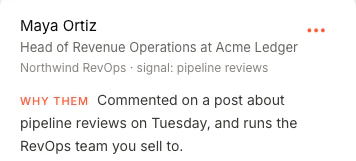
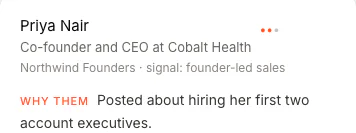
You get each person's name, title and company, how well they fit, the signal that found them and the reason they're on your list.
Connect FOUND once: add its address in Claude, sign in and click Allow. Then ask Claude for this week's warm leads, research an account, draft an opener, see how outbound is going, and set up a paused campaign your agent runs at a safe pace once you switch it on.
Who are my warmest leads this week, and why is each one there?
Claude picks the FOUND tool that fits the question. Each one reads your account, writes a draft or prepares work that waits for you in FOUND. None of them sends.
Who are my warmest leads this week, and why is each one there?
You get each person's name, title and company, how well they fit, the signal that found them and the reason they're on your list.
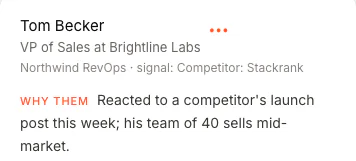
Draft an opener for Tom Becker that starts from why he was found.
You get the message FOUND would send him, written from why he was found and your own offer. Nothing is queued or sent.
How did outbound do in the last 7 days? Which signals brought the people who replied?
You get people contacted, invited, accepted and replied, the rates, conversations and what is waiting, per channel, per signal and per campaign: the same numbers as your Dashboard.
Find 20 UK fintech companies hiring their first account executive, and the head of sales at each.
You get the price first: 1 credit per company plus 1 per contact, and 1 per email if you ask for emails. Claude asks you before it runs; the results land in a new FOUND list a few minutes later. Up to 50 companies a search, 5 searches a day.
Make a campaign for those companies, with a three-step sequence.
It's created paused, with that list as its source. Nobody hears from it until you switch it on in FOUND. Then FOUND reads each profile, keeps the people who fit the campaign's buyer, and they follow its sequence at your agent's pace, through every cap and your block list.
How many invitations has my account sent today, and how many credits are left?
Your plan, your LinkedIn account and mailbox, today's invitations against the cap, your campaigns and lists, credits and searches left today.
These are 7 of FOUND's 18 tools. Claude also compares campaigns, breaks results down by job title or signal, ranks accounts by new buying signals and researches a company. Every tool, and what it costs
No code, no key to paste. You need a FOUND account, and Claude on claude.ai, the desktop app or your phone.
No FOUND account yet? Start your agent first: you see real leads for your own buyer before you pay.
Open Customize → Connectors. Click Add custom connector.
Enter Name FOUND and the address above. If it asks about Authentication, pick Sign in now and keep Use Claude's published identity.
Click Add, then Connect. FOUND's page opens: sign in with Google if asked, then click Allow.
In a chat, click + → Connectors and switch FOUND on. When Claude asks to use a tool: Allow once. Keep Always allow for the tools that only read.
Who are my five warmest leads this week, and why is each one there?
Use ChatGPT as well? The same address works there. See the ChatGPT steps Cursor, Claude Code and other clients
Claude can read your account, draft, and prepare work that waits for you in FOUND. Sending stays with your agent, behind the same limits as everything else it does.
Whatever it adds goes through the same planner, pacing, limits, block list and opt-outs as everything else.
Claude gets you to the right people faster. What happens next is your agent's job, and it ends on your booking link.
Who's warm, what's new at an account, what to say. Then set up a paused campaign and switch it on in FOUND.
From your own LinkedIn and inbox, inside your window, steering toward a short call.
Their sequence stops. With AI draft replies on, a drafted answer offers your booking link; nothing sends until you press Send.
Switch it on for a thread and it replies at a human pace, then hands back what it can't answer.
On your own booking tool. FOUND never reads or writes your calendar.
Pick Book demos as your goal and add your booking link in Settings. Every message steers toward a short call, and with AI draft replies on, every interested reply gets a draft that offers it.
Watch the demoSomething else on your mind? Write to hello@foundtofind.com.
All questionsAny plan, on claude.ai, the desktop app or your phone. The Free plan allows one custom connector.
On Team and Enterprise, an Owner adds FOUND for the organisation first; then each member connects it and signs in to their own FOUND.
Neither. You connect LinkedIn on FOUND's own page, and your password passes through our server once, straight to our LinkedIn connection provider. It is never stored or logged.
To connect Claude, you sign in on FOUND's page and click Allow. Claude gets its own access to your FOUND account, which you can take back at any time; no password is ever passed to it.
Nothing on top of your plan: the connector is part of FOUND's $69 a month. Reading your leads and numbers, researching accounts, drafting and setting up paused campaigns is included.
Two things spend credits, and each shows the price before it runs: finding new companies and contacts (1 credit per company, 1 per contact, 1 per email if you ask for emails) and finding a lead's work email (1 credit, only if an address is found).
In FOUND, open Settings, then Connect. Under Connected assistants, click Disconnect next to Claude, then Yes, disconnect: it stops working in Claude at once. You can connect it again any time.
It can't send anything, and it can't switch a campaign on. A campaign it sets up starts paused and changes only while it's paused. Once you switch it on in FOUND, it goes out through the same pacer as everything else: 35 invitations a week to start, rising one step every two clean weeks to 125 at most, spread through your daily window on weekdays.
Claude can make up to 30 requests a minute per account.
FOUND spots them from what they do on LinkedIn, writes to them from your own account, and hands the interested ones your booking link.