LinkedIn connection message templates: 27 notes under 200 characters, by situation
A note for each moment that gives you a reason to write, from a post they wrote to a profile view. Every one fits LinkedIn's 200-character limit and says when to use it.
On this page 15 sections
Quick answer: A good LinkedIn connection message gives one reason that fits only this person, says who you are in a few words and asks for nothing but the connection. LinkedIn's help page caps a note at 200 characters and a basic account can add one to three requests a month. The 27 templates below each fit, sorted by the moment that gives you a reason to write.
Most invitations go out blank or with a line that could go to anyone. The ones people accept give a reason that fits only the person reading: something they wrote, a move they made, a person or a place you share.
Below are 27 notes built that way, grouped by that moment. Each stays under 200 characters with its placeholders in, leaving room for real names.
How long a LinkedIn connection message can be
LinkedIn's help page on personalizing invitations, checked on 25 Oct 2026, sets three rules: a note on up to three connection requests a month, up to 200 characters per note and a note on every request for Premium members, within LinkedIn's invitation limits.
An older LinkedIn help page and plenty of guides, still give Premium notes 300 characters. Writing to 200 keeps a note safe on any account, so every template here stays under it.
- On desktop: open their profile, select Connect, click Add a note, write it, then Send invitation.
- In the app: open their profile, tap the More icon, tap Personalize Invite, write it, then Send Invitation.
- One exception: invitations sent from People You May Know in the mobile app can't carry a note.
Check a draft with the LinkedIn connection note checker, which counts the characters and flags links and openers that fit anyone. Weekly invitation limits are separate, covered in LinkedIn connection limits.
What goes in a connection note
LinkedIn's own advice for a note names three things: how you found the person or what you have in common, why you want to connect now and a clear, polite tone. In practice that is three short parts, in this order:
- The reason. One line only this person could receive: the point in their post, the seat they just took, the school you share.
- Who you are. A clause, not a pitch, in their words rather than your job title. "I help clinic owners fill their calendars" tells them more than "Account Executive at Acme".
- A soft close. "Glad to connect" is plenty. No call, no link, no deck: the only thing a note needs is a yes.
Fill every bracket with something true and specific. What to write once they accept is in how to write a LinkedIn cold message.
After they write a post
The strongest reason: they chose the topic. Name the idea, not the reactions.
Name one detail
Hi [Name], your post on [topic] put words to something I see every week: [detail]. I work on the same problem at [Your company]. Glad to connect.
- When
- the post is recent and one line is quotable.
- Length
- 145 characters
Add one thought
Hi [Name], your post on [topic] made me think of one more angle: [your point]. Curious whether you've seen the same. Would be glad to connect.
- When
- you have a genuine addition, not a correction.
- Length
- 142 characters
The regular reader
Hi [Name], I've read your last few posts on [topic] and keep nodding along. Would be glad to connect and follow your writing here.
- When
- they post often and no single post stands out.
- Length
- 130 characters
After they leave a comment
A comment is writing too, often sharper than the post. Hand their point back.
Their point, back to them
Hi [Name], your point that [their point] was the most useful line in the discussion on [topic]. I work on that problem with [type of company]. Glad to connect.
- When
- their comment made a clear claim you agree with.
- Length
- 159 characters
The follow-up question
Hi [Name], you made a strong case for [their point] in the thread on [topic]. How did you get your team to adopt it? Would be glad to connect.
- When
- their comment describes something they did.
- Length
- 142 characters
Same thread
Hi [Name], we both weighed in on [Author]'s post about [topic] and your take on [detail] was better than mine. Would be good to stay in touch.
- When
- you commented on the same post yourself.
- Length
- 143 characters
When they start a new role
A new seat brings new problems. LinkedIn's sales team suggests waiting: every seller gets the same job-change alert and week three or four may land better than day one.
The first-month note
Hi [Name], congrats on taking the [role] seat at [Company]. A new role usually means a long list and [problem] tends to be near the top. Glad to connect.
- When
- they started in the last few weeks.
- Length
- 154 characters
A few weeks in
Hi [Name], a few weeks into [role] at [Company] now. I'm curious what surprised you most. I work with [role]s on [problem] and would like to connect.
- When
- the congratulations have died down.
- Length
- 149 characters
The promotion
Hi [Name], well deserved on the move up to [role]. I spend my days with [role]s working on [problem] and would be glad to have you in my network.
- When
- they moved up inside the same company.
- Length
- 145 characters
When their company is hiring
A job post shows what a team is about to take on. Write to whoever leads it, not the recruiter.
The growing team
Hi [Name], looks like [team] at [Company] is growing fast. That stretch is usually when [problem] starts to bite. I work on exactly that. Glad to connect.
- When
- the team you sell to has several openings.
- Length
- 154 characters
Not a candidate
Hi [Name], your [role] opening caught my eye, though not as a candidate. I help teams like yours with [problem] while a seat is empty. Glad to connect.
- When
- you write to the hiring manager on the job.
- Length
- 151 characters
The first hire in a function
Hi [Name], a first [role] hire is a big step for [Company]. I work with teams building that function from scratch and would like to connect.
- When
- it is the company's first hire of its kind.
- Length
- 140 characters
When their company raises money
A round means a plan with deadlines. Show you know the stage they are entering.
The congratulations
Hi [Name], congratulations on [Company]'s [round]. The next year looks busy. I work with teams at your stage on [problem]. Would be glad to connect.
- When
- the round was announced in the last month.
- Length
- 148 characters
The stage question
Hi [Name], great news on the raise. Most teams I meet after a [round] go after [goal] first. Curious if that's true for [Company]. Glad to connect.
- When
- you know what that stage usually tackles first.
- Length
- 147 characters
The plans they announced
Hi [Name], I read what [Company] plans to build with the new round, especially [plan]. I work on [problem] for teams at that stage. Glad to connect.
- When
- the announcement said what the money is for.
- Length
- 148 characters
Companies that just raised, by stage: recently funded startups.
Before and after an event
A shared room, in person or online, is reason enough. Before it, suggest hello; after it, name something said.
Before the event
Hi [Name], looks like we're both going to [event]. I'll be at the session on [topic]. Would be good to connect now and say hello there.
- When
- they said they're going or they're speaking.
- Length
- 135 characters
After their talk
Hi [Name], your talk at [event] on [topic] was the one I took notes in, especially the part about [detail]. Would be glad to connect.
- When
- they spoke and you can name one thing they said.
- Length
- 133 characters
After you both attended
Hi [Name], we were both at [event] last week. I'd like to keep the conversation about [topic] going here. Glad to connect.
- When
- you were there but didn't get to talk.
- Length
- 122 characters
Through a mutual connection
A shared name helps only if the relationship is real. LinkedIn's sales team advises asking permission before using their name, since your reader may check with them.
They suggested it
Hi [Name], [Mutual] suggested I reach out. They thought we should compare notes on [topic]. Would be glad to connect.
- When
- the mutual connection agreed to the introduction.
- Length
- 117 characters
You know them both
Hi [Name], [Mutual] and I worked together at [Company] and your name came up when we talked about [topic]. Would be good to connect.
- When
- their name came up in a real conversation.
- Length
- 133 characters
A shared circle
Hi [Name], we know a few of the same people in [community], [Mutual] among them. I work on [problem] and would be glad to connect.
- When
- you share real contacts, not just a count.
- Length
- 130 characters
When you went to the same school
Add the program or year, so it reads as a real link, not a search filter.
Fellow alum
Hi [Name], fellow [School] alum here ([program], [year]). I see you lead [team] at [Company]. I work with [role]s on [problem]. Glad to connect.
- When
- they fit your buyer and you share a school.
- Length
- 144 characters
Same field
Hi [Name], always good to meet another [School] grad working in [industry]. Would be glad to connect and swap notes on [topic].
- When
- you are networking in their industry, not selling yet.
- Length
- 127 characters
After they engage with a competitor's post
They care about the problem. Write about the topic, never the post, the click or the other company.
They commented
Hi [Name], your point that [their point] is one I hear from a lot of [role]s. I work on [problem] and would value having you in my network.
- When
- they wrote a comment with a view of their own.
- Length
- 139 characters
They reacted
Hi [Name], [topic] seems to be on a lot of [role]s' minds this quarter. I work on it with teams like [Company]'s. Would be glad to connect.
- When
- all you know is the topic they engaged with.
- Length
- 139 characters
After they view your profile
A view is a nudge, not a reason: open with their work and leave the view out. Which viewers deserve a note is in how to see who viewed your LinkedIn profile.
Their company's work
Hi [Name], I've been following how [Company] approaches [topic]. I work with [role]s on [problem] and would be glad to connect.
- When
- the viewer fits your buyer.
- Length
- 127 characters
Close to your work
Hi [Name], your work on [project] at [Company] sounds close to what we do at [Your company]. Would be good to connect and compare notes.
- When
- their profile shows a project near your field.
- Length
- 136 characters
Five notes that get ignored
- The pitch. A product, a price or a meeting request before they know you.
- The note that fits anyone. "Looking to grow my network with like-minded professionals" says nothing about the reader.
- The confession. "Noticed you checked out my profile" or "saw you reacted to my post" tells them they were watched.
- The link. It reads as an ad before you have said hello.
- The blank. "Hi [Name]" reaching a real person. Read every note once before it goes.
How FOUND writes these notes for you
Picking the right note means reading each person's profile and posts first. FOUND, an AI SDR for LinkedIn, does that reading for every lead. It watches buying signals every day, such as posts about the problem you solve, engagement with a competitor's posts, new roles, hiring and fresh funding and checks each person against your buyer twice: the headline first, then the full profile.
On a Premium account it writes each note from what that person did and never tells them it saw a like or a reaction. A note with a blank it could not fill is held back and review mode holds every invitation for your approval. Once someone accepts, it writes every message and email in the sequence from the same signal. Replies from both land in one inbox. On our founder's own account, notes that named something the person wrote were accepted 69% of the time, against 29% for generic notes and 23% with no note.
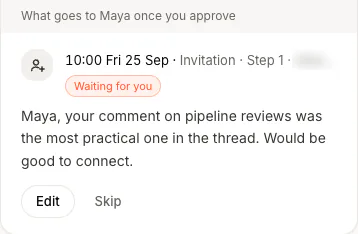
It costs $69 a month for two agents, one LinkedIn account, one mailbox and 100 credits, with seats on the pricing page and you see your first real leads before you pay.
Questions
What should I write in a LinkedIn connection message?
One line on why you are writing to this person, a few words on who you are and a soft close such as "Glad to connect". Keep pitches and links for later.
How many characters can a LinkedIn connection note have?
Up to 200, per LinkedIn's help page on personalizing invitations, checked on 25 Oct 2026. An older LinkedIn page gives Premium members 300, so writing to 200 is safe on any account.
How many personalized invitations can I send without Premium?
Three a month, per LinkedIn's help page. Premium members can add a note to every invitation, though limits on how many invitations you send still apply.
Can someone reply to my note without accepting?
Yes. LinkedIn says the person can reply to your note without accepting and the reply shows up in your messages.
Does FOUND write connection notes?
Yes, on a Premium account, each written from what that person did, with every invitation held for your approval in review mode. Without Premium, invitations go out with no note.