LinkedIn connection limits: invitations a week, a day and in total
LinkedIn's weekly limit is most widely reported at about 100 invitations (Forbes Business Council, 2021), with up to 30,000 connections in total (Entrepreneur, 2021). Then how FOUND paces an account: 35 invitations a week to start, past 100 only while every invitation goes through and 125 at most, never more than 25 in a day.
On this page 12 sections
Quick answer: LinkedIn's weekly invitation limit is most widely reported at about 100 (Forbes Business Council, 2021), with up to 30,000 connections in total (Entrepreneur, 2021). Nobody outside LinkedIn knows the safe number for your account, so start low: FOUND starts an account at 35 invitations a week, goes past 100 only while every invitation goes through and never sends more than 125 a week or 25 in a day.
The honest answer first: nobody outside LinkedIn can tell you a number that is safe for your account and anyone who promises one is guessing. What a tool can do is send less than it could, spread it out the way a person would and back off the moment something looks wrong.
Below: what is widely reported about LinkedIn's own limits, each line with its source and date, then how FOUND does that, with the numbers. Every one of FOUND's numbers is enforced in code, not left to a setting you might forget and the main ones are also written into our FAQ and terms.
The short answer
- LinkedIn, invitations: about 100 a week is the figure most widely reported, since a Forbes Business Council article described it in June 2021, counted over a rolling week and tied to your account's standing, not your plan (Online Tech Tips, August 2026).
- LinkedIn, connections: up to 30,000 first-degree connections in total (Entrepreneur, July 2021).
- FOUND, invitations: nothing in the first 48 hours, then 35 a week, one step up every two weeks with no failed sends, to 125 a week on the Monday to Friday window every account starts with, never more than 25 in a day.
- FOUND, push-back: if LinkedIn pushes back, a 72-hour pause and one step down.
| Limit | LinkedIn, as widely reported | FOUND's pacing |
|---|---|---|
| Invitations a week | About 100 (Forbes Business Council, June 2021) | 35 to start, past 100 only while every invitation goes through, up to 125 on a Monday to Friday window |
| Invitations a day | Reported as a weekly limit over a rolling window (Online Tech Tips, August 2026) | Up to 25 |
| Total connections | 30,000 first-degree connections (Entrepreneur, July 2021) | The same cap as any account: FOUND sends from yours |
| Notes on invitations | Three a month on a free account, unlimited on Premium (HubSpot, September 2026). Up to 200 characters, as HubSpot and MakeUseOf (July 2024, without Premium) report; 300 at the longest widely reported (CNBC, November 2023) | A short personal note on a Premium account; no note without Premium |
| When you hit it | It lifts on LinkedIn's own schedule and can't be raised in settings (Online Tech Tips, August 2026) | A 72-hour pause and one step down |
LinkedIn's weekly invitation limit
The number most widely reported is about 100 invitations a week. A Forbes Business Council article in June 2021 described the move to it, from as many as 200 a day before.
To plan your own week against these numbers, use the LinkedIn invitation planner: type how many invitations you send a day and on how many days and it shows the week against the widely reported limit.
Online Tech Tips (August 2026) describes the limit as a rolling weekly window tied to your account's standing, not your subscription and one you can't raise in your settings.
So treat 100 as a common figure, not a promise for your account. Online Tech Tips ties the limit to each account's standing, so it can differ from one account to the next. FOUND starts well below it, at 35 invitations a week and climbs one step at a time, each after two weeks with no failed sends, to 125 a week at most on the Monday to Friday window. It climbs past 100 only while every invitation goes through: the first one LinkedIn refuses holds it on its step and the moment LinkedIn pushes back, it pauses and steps down.
What about a daily limit? The sources above describe a weekly limit, counted over a rolling window. FOUND adds its own ceiling of 25 invitations a day, so a week is spread over the working days instead of sent in a burst.
The limit on total connections
An account can have up to 30,000 first-degree connections, as Entrepreneur reported in July 2021 in an article built on tips from a LinkedIn product manager. The same article notes that following someone shows you their posts and articles without a connection.
The weekly limit is the one most outreach meets first. This one matters once a network grows very large.
Do LinkedIn invitations expire?
We found no recent independent source that gives a firm expiry date, so we won't print one.
What Online Tech Tips reported in August 2026: unanswered invitations sit in your Sent tab (My Network, then Manage, then Sent), where you can withdraw each one; a large pile of pending invitations can block new ones even while you are under the weekly limit; and withdrawing a large batch, then sending the same invitations again right away, is best avoided.
So a tidy habit beats a deadline: withdraw invitations that have sat unanswered for weeks and spend the next ones on people with a reason to accept.
Invitation notes, with and without Premium
HubSpot's blog (updated September 2026) reports that a free account can add a personal note to three invitations a month, that Premium members can send unlimited ones and that a note runs to 200 characters. MakeUseOf (July 2024) gives the same 200 for an account without Premium and the longest note widely reported is 300 characters, the figure CNBC gave in November 2023.
In FOUND, the invitation is the first step of every new LinkedIn campaign. On a Premium account it carries a short personal note written from what the person did. A LinkedIn account without Premium sends it with no note and the icebreaker, the day after they accept, opens the conversation. The steps are in campaigns and sequences.
A Premium or Sales Navigator account also lets FOUND read who viewed your profile, once a day. What to say to those viewers is in how to see who viewed your LinkedIn profile.
What happens when you hit the limit
Online Tech Tips (August 2026) puts it plainly: the limit is LinkedIn's, you can't raise it in settings and it lifts on LinkedIn's own schedule.
Sending harder doesn't bring that day closer. What helps while you wait:
- Stop sending invitations until the limit lifts and don't retry the same ones.
- Withdraw invitations that have sat unanswered for weeks.
- Write to people you are already connected with: a message to a connection doesn't use an invitation.
- Next week, send fewer, to people with a reason to accept.
FOUND does the first of these by itself: if LinkedIn answers with a rate limit, the account stops for 72 hours and steps down, as when LinkedIn pushes back explains.
FOUND's ladder
A newly connected account starts on the first step and earns each one after it. A day's share is the week's limit spread over five working days and never more than 25. The table is for the Monday to Friday window every account starts with.
| Step | A week | A day | At the earliest |
|---|---|---|---|
| Step 1 | 35 | 7 | Day three |
| Step 2 | 70 | 14 | Week 2 |
| Step 3 | 100 | 20 | Week 4 |
| Step 4 | 125 | 25 | Week 6 |
On paper the weekly limit keeps climbing, to 140 at week 6 and 175 at week 8, but on a Monday to Friday window it changes nothing from week 6: never more than 25 in a day means 125 a week at most there. Add Saturday or Sunday to the window and those days count too, so the week can reach 140 from week 6 and 175 from week 8.
Each step needs two weeks since the last one and no failed sends in the past 14 days. The climb is reviewed once a week, so a step can come later than the table says, never sooner. Every limit, for invitations, messages and visits, is in one table in senders and safety.
Why one step at a time? A sudden jump in what an account does is the pattern most worth avoiding, so FOUND starts well below the top and only climbs while everything it sends goes through cleanly. A failed send is the first sign LinkedIn is unhappy with an account and climbing then is how accounts get restricted, so the ladder holds still.
The first 48 hours send nothing
For its first 48 hours, a newly connected account only finds people. You get leads the day you connect and messages from day three, which also gives you time to read the leads and the messages before anything goes out.
How a day is spread
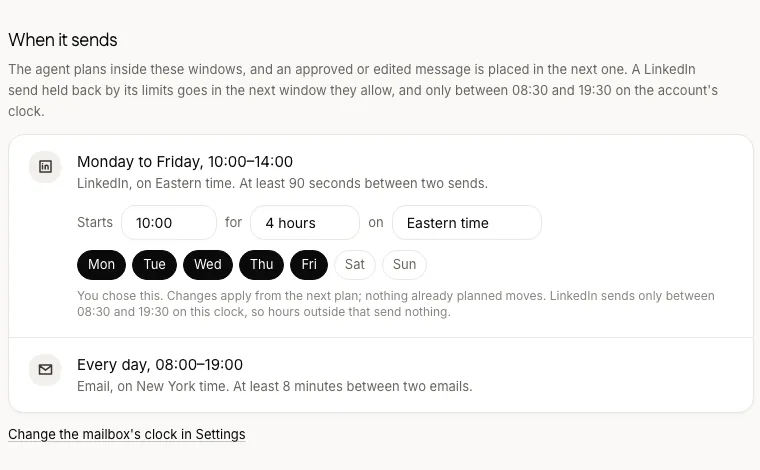
- Inside a window. LinkedIn actions go out in a window of a few hours that you set, Monday to Friday, 10:00 to 14:00 to start and never outside 08:30 to 19:30 on your account's own clock.
- Never on a tick. At least 90 seconds between two actions, plus a random wait of up to four minutes on top.
- No catching up. If a day's window is missed, that day is gone; tomorrow doesn't send double.
- Messages and visits have their own limits: up to 20 messages and 20 profile visits a day and 100 of each a week. A message to someone already connected doesn't use an invitation.
- Your own address. Every LinkedIn account gets its own residential IP in the country you choose.
When LinkedIn pushes back
If LinkedIn answers an action with a rate limit, the account stops for 72 hours and drops one step. It can't climb back while it has failed sends in the last 14 days, so a push-back costs it at least a week on the lower step. Going more slowly after a warning, rather than retrying at the same speed, is the point.
Email has its own ladder
A mailbox sends 5 emails on its first day of sending and 5 more each day up to 30, 40 from day 21 and 60 from day 35, at least 8 minutes apart, between 08:00 and 19:00 on the mailbox's own clock. A burst of cold email from a new mailbox can hurt your domain's reputation and unlike a LinkedIn restriction, that damage follows your domain, not just the one mailbox.
What no one can promise
LinkedIn's User Agreement restricts automated tools, so any tool that acts through your account carries some risk. Pacing like this lowers it; it can't remove it and we say so in our terms as well as here. If a tool promises your account is safe at any number, ask what it does the day LinkedIn disagrees.
Pacing is one half of it. The other is only writing to people with a reason to hear from you, which is what the signals are for.
Questions
How many LinkedIn invitations can I send a week?
About 100 is the figure most widely reported, since a Forbes Business Council article described it in June 2021 and Online Tech Tips (August 2026) describes the limit as tied to your account's standing, so it can differ from one account to the next. FOUND starts at 35 a week and climbs after clean weeks to 125 at most, never more than 25 in a day. It climbs past 100 only while every invitation goes through and the first one LinkedIn refuses holds it on its step.
What is LinkedIn's connection limit?
30,000 first-degree connections, as Entrepreneur reported in July 2021. The weekly invitation limit is the one most outreach meets first.
Do LinkedIn invitations expire?
We found no recent independent source with a firm date. Online Tech Tips (August 2026) reports that pending invitations sit in your Sent tab, where you can withdraw them and that a large pile of them can block new ones.
Does Premium change the limits?
For notes, yes: HubSpot's blog (September 2026) reports unlimited personal notes on Premium, against three a month on a free account. For the weekly invitation limit, Online Tech Tips (August 2026) describes it as tied to your account's standing, not your subscription.
Is 100 invitations a week safe?
It's step three of FOUND's ladder, reached in week four at the earliest and only after four weeks with no failed sends. Whether it's safe for a particular account depends on things no tool can see from outside, which is why FOUND climbs to it instead of starting there.
Can I change how fast FOUND sends?
You can make it slower or more careful, with review mode or by pausing a signal or the whole agent. The ladder climbs only after clean weeks and the limits are enforced in code for every account.
Does FOUND send at weekends?
Only if you add Saturday or Sunday to your window on the agent's Settings tab. It starts Monday to Friday. Email can go out any day, between 08:00 and 19:00 on the mailbox's clock.
What counts as a failed send?
An invitation, message or profile visit that LinkedIn refuses. Any failed send in the past 14 days keeps the account on its current step.