LinkedIn cold message: how to write one that gets answered, with 12 examples
Where a cold message can go on LinkedIn, the four parts of one people answer, twelve examples by situation and the habits that get messages ignored.
On this page 7 sections
Quick answer: A LinkedIn cold message gets answered when its first line is about the reader, the whole message stays under about 75 words and it ends with one question that is easy to answer either way. Send it once they accept your connection request or as an InMail if you have Premium credits. Never open with a pitch, a link or how you found them.
A cold message is the first thing you write to someone who has never heard from you. On LinkedIn it lands beside messages from people they know, so it has a few seconds to show it was written for them.
This guide covers where a cold message can go, a four-part structure that works in each of those places, twelve examples by situation with their word counts, one follow-up and the habits that get messages ignored.
Where a LinkedIn cold message can go
LinkedIn gives you four ways to write to someone you have never spoken to, each with its own rules, as its help center states them on 25 Oct 2026:
- A connection request with a note. Up to 200 characters. A basic account can add a note to three requests a month; Premium members, to every request.
- A message once they accept. Messages between connections cost nothing, so the note opens the door and the message does the talking.
- InMail. A paid message to someone outside your network, with an optional subject of up to 200 characters and a body of up to 2,000. Each uses a credit: 5 a month on Premium Career, 15 on Premium Business, 50 on Sales Navigator.
- A message request. To a coworker or a member of a Group you share, without connecting first. They can accept or quietly decline and attachments can't be sent.
Premium members who switch on Open Profile can also be messaged by anyone, at no cost.
For most cold outreach the request goes first and the message follows once they accept; ready notes are in 27 LinkedIn connection message templates. InMail suits the few people who matter most and sit outside your network, as what InMail is and how its credits work explains.
The four parts of a message people answer
Every example below has the same shape, with one or two sentences per part:
- Why them. A first line about the reader: their post, their new role, their company's news, a person you both know. If it would work for anyone else, rewrite it.
- Why you. One sentence on what you help people like them do, in the words they use for the problem.
- One idea. An observation, a result from a similar company or an offer of something useful. One, not three.
- One easy question. Something they can answer in a line, where no is an acceptable answer. "Worth a chat or bad timing?" is easier to answer than "Can we find 30 minutes next week?"
LinkedIn's sales team gives similar advice for InMail: aim for 50 to 75 words, since many are read on phones and include one clear ask. Its help center adds two more: mention the profile content that prompted you to write and give the reader a reason to reply.
Every example here stays under 75 words.
12 LinkedIn cold message examples
Each one says how long it is, counted with the brackets in and why it works. Swap every bracket for something true about the reader before you send it.
After they accept your note
Thanks for connecting, [Name]. I meant what I said about your post on [topic], especially [detail]. I help [type of team] with [problem] and we keep seeing [short observation]. How are you handling [specific part] at [Company] right now?
- Words
- 39
- Why it works
- It picks up where the note left off, adds one observation and asks about their situation, not your product.
They accepted a request with no note
Hi [Name], thanks for accepting. I reached out because you lead [team] at [Company] and I work with [role]s on [problem]. Is that on your plate this quarter or not really?
- Words
- 31
- Why it works
- It explains the request in one line and makes no an easy answer, which still tells you something.
They posted about the problem you solve
Hi [Name], your post about [problem] hit home. We see the same pattern at [type of company]: [one-line observation]. I wrote down three things that helped teams like yours. Want me to send them over?
- Words
- 35
- Why it works
- It answers their post with something useful and asks before sending anything.
They started a new role
Hi [Name], congrats again on the [role] role. The first months come with a long list and [problem] is often on it. I help new [role]s get ahead of it. Would a short summary of what has worked for others be useful?
- Words
- 42
- Why it works
- It respects how busy a new seat is and offers something small before asking for time.
Their company is hiring the team you sell to
Hi [Name], looks like [Company] is hiring [number] [role]s. When a team grows that fast, [problem] usually follows within a quarter. We help teams like yours [outcome]. Worth a short chat before the new people start or too early?
- Words
- 39
- Why it works
- It ties public hiring news to a problem they will soon have and the question is about timing, not commitment.
Their company just raised
Hi [Name], congratulations on the [round]. After a raise, most [role]s I talk to are asked to [goal] fast. We help [type of company] do that without [pain]. Is that on your list for the next two quarters?
- Words
- 38
- Why it works
- It names the pressure a round brings, not just the round and asks about their plan.
They spoke at an event
Hi [Name], thanks for your session at [event]. Your point on [detail] matched what we see with [type of company]. One question you didn't get to: [question]? I'd like to hear how you would answer it.
- Words
- 36
- Why it works
- It shows you listened and it opens on their expertise, which people are glad to talk about.
A mutual connection suggested it
Hi [Name], [Mutual] suggested I write. We were talking about [topic] and they said you've thought about it more than most. I help [role]s with [problem]. Would you be open to comparing notes for 15 minutes next week?
- Words
- 38
- Why it works
- The introduction does the work and LinkedIn's sales team advises clearing it with the mutual connection first.
You share a LinkedIn Group
Hi [Name], we're both in [Group]. Your answer on [topic] there was the clearest in the thread. I work on [problem] with [type of company] and I'd like to hear how you handle [part]. Open to a short exchange here?
- Words
- 40
- Why it works
- LinkedIn lets you send a message request to members of a Group you share and their own answer is the reason to write.
They engage with a topic your competitors post about
Hi [Name], a lot of [role]s are rethinking [topic] this year. We help teams like [Company]'s [outcome] without [pain]. If it's on your radar, I can share how [similar company] approached it. Useful or not a priority?
- Words
- 37
- Why it works
- It speaks to the topic they care about, never the post or the click and the question has two easy answers.
They viewed your profile
Hi [Name], I've been reading about how [Company] is growing its [team or market]. I help [role]s at companies your size with [problem]. If it's relevant, I can share how [similar company] approached it. If not, no worries.
- Words
- 38
- Why it works
- It never mentions the view. Their company is the reason and the close makes no a comfortable answer.
An InMail to someone outside your network
Subject: [Topic] at [Company]
Hi [Name], your interview on [topic] made a point I rarely hear: [detail]. We help [type of company] [outcome] and [similar company] saw [result] in [time]. Worth a short conversation or bad timing? Either answer helps.
- Words
- 36
- Why it works
- The subject puts the topic first, inside the 30 to 40 characters LinkedIn says phones show and on Premium an answer either way, even a decline, returns your credit.
One follow-up, done right
No answer? Wait at least three days, then send one short follow-up that adds something new. Leave out their name and "just checking in", so it reads like the next line of a conversation rather than a reminder.
The follow-up
One more thought on [topic]: [new fact, number or short story about a similar company]. If it's useful, I can send the two-paragraph version. If now isn't the time, no problem at all.
- Words
- 33
- When
- three or more days after a message that got no answer.
If that goes unanswered too, let it rest: a new reason to write later, such as a new role or a raise, beats a third nudge. When they do reply, turning LinkedIn replies into booked calls covers what to send next.
What to never do in a LinkedIn cold message
- Pitch in the first line. The first line decides whether they read the second, so make it about them.
- Send a link or a deck unasked. Offer it and send it when they say yes.
- Ask for 30 minutes on day one. Ask a question they can answer in a line; the call comes later.
- Say how you found them. "Saw you liked a post about..." or "noticed you looked at my profile" tells them they were watched. Talk about the topic instead.
- Paste a template unchanged. A bracket left in or a line that fits a thousand people, gets ignored.
- Write a wall of text. On a phone, three short paragraphs already fill the screen.
- Follow up the next day. Wait at least three days and bring something new.
The same rules hold by email, where 16 cold email templates apply them step by step.
Where FOUND fits
A first line like these means reading each person's posts and profile before you write. FOUND, an AI SDR for LinkedIn, does that for every lead: it watches buying signals every day, checks each person against your buyer twice and writes the connection note and every message after it from what that person did, in your tone. It finds each lead's verified work email too and mixes emails from your own mailbox into the same sequence.
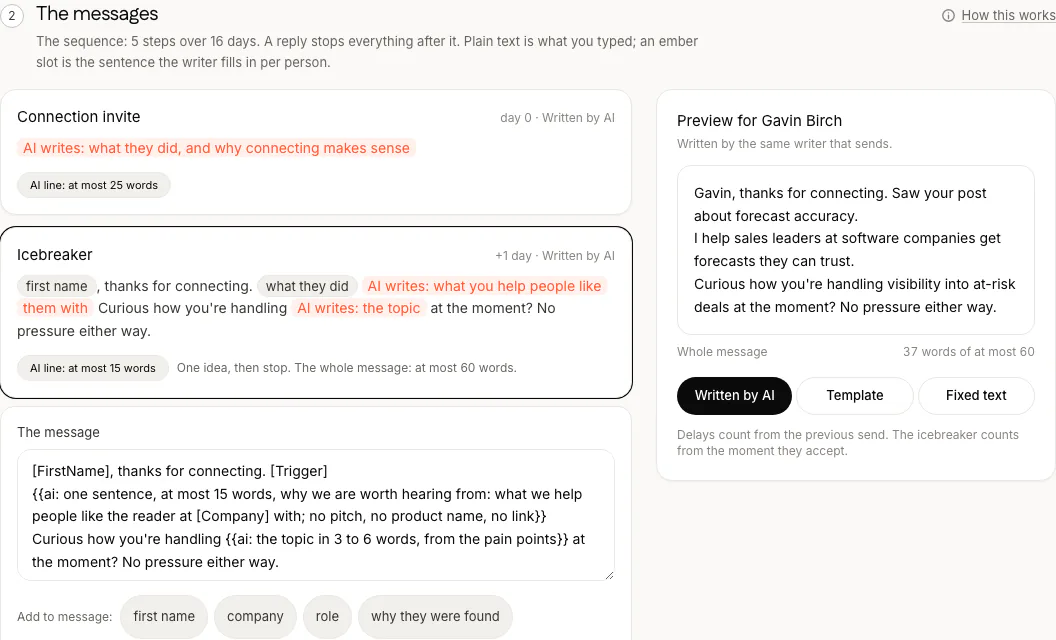
Review mode holds every invitation, message and email until you approve it and a reply stops everything queued for that person. The agent answers replies in minutes and offers your meeting link when someone is interested; anything it cannot promise comes to you. It costs $69 a month for two agents, one LinkedIn account, one mailbox and 100 credits, with seats on the pricing page and you see your first real leads before you pay.
Questions
How do you write a cold message on LinkedIn?
Open with a line about the reader, say in one sentence what you help people like them do, offer one idea or result and end with one easy question. Keep it under about 75 words, with no link and no meeting request.
Can you message someone on LinkedIn without connecting?
Yes, three ways: an InMail, which takes a Premium or Sales Navigator credit; a message to a Premium member who has Open Profile on; or a message request to a coworker or a member of a Group you share. Otherwise a basic account can message only its connections.
How long should a LinkedIn cold message be?
Short enough to read in one phone screen. LinkedIn's sales team suggests 50 to 75 words for an InMail and every example in this guide is under 75. InMail allows 2,000 characters, but that is a ceiling, not a target.
Should I follow up on a LinkedIn cold message?
Once, at least three days later, with something new: a fact, a result or a resource. If that goes unanswered, wait for a fresh reason to write, such as a new role or a raise.
Should I mention that someone viewed my profile?
No. It tells them they were watched and gives them nothing to answer. Write about their company or their work instead.
Can FOUND write my LinkedIn cold messages?
Yes. It writes the connection note on a Premium account and every message after it from what each person did and review mode holds each one until you approve it. It costs $69 a month for two agents, one LinkedIn account, one mailbox and 100 credits.