How to turn LinkedIn replies into booked calls, without living in your inbox
When someone writes back: stop everything else, answer what they asked, offer one easy step, and hand over what only you can answer. Here's how, and which parts an agent can do for you.
On this page 8 sections
Outbound rarely falls apart at the first message. It falls apart at the reply: someone writes back asking how it works, the follow-up that was already queued goes out anyway, or the answer arrives two days later, after the moment has passed.
This guide is about the part after the reply. It sets out five rules for turning an interested answer into a call, and shows how FOUND handles each one: what it drafts for you, what its agent can do on its own if you let it, and what it always hands back.

1/3 · A reply, with your link draftedReal FOUND screens · sample workspace · Sep 202616 seconds, no sound
Rule 1: a reply stops everything
The moment someone answers, every step still queued for them has to stop. Nothing kills a warm reply faster than your second follow-up landing an hour after they wrote "sounds interesting".
In FOUND, a reply ends that person's sequence at once and cancels anything queued to them, on LinkedIn and email. Anyone who replies "stop", "unsubscribe" or "not interested" is never contacted from your account again.
Rule 2: sort replies by what they need
Replies aren't all the same job. Most fall into one of six kinds, and each needs something different from you:
| They wrote | What they need | What FOUND's agent does |
|---|---|---|
| "How does it work?" "What does it cost?" | A real answer, then one easy step | Answers it, and offers your booking link because they showed interest |
| "Talk to Priya, she runs RevOps" | An introduction | Asks for the introduction in one line |
| "Not this quarter" | A gracious line, no push | One line that leaves the door open, and no ask |
| "Thanks!" "Noted" | Nothing | Lets them have the last word |
| "Not interested" "Stop" | Nothing, ever again | Stops them and cancels anything queued |
| An out-of-office | Nothing | Ignores it |
With the agent off and AI draft replies on (one switch in Settings), a drafted answer waits for you on the replies that need one. FOUND's inbox holds LinkedIn and email together and opens on the Interested filter, so the replies that can become calls are the first thing you see.
Rule 3: answer the question, then offer one step
Answer what they actually asked, in two or three sentences, from what you really sell. Then offer one easy next step, once. Don't bolt a call request onto a thank-you, and don't repeat it in every message after it's on the table.
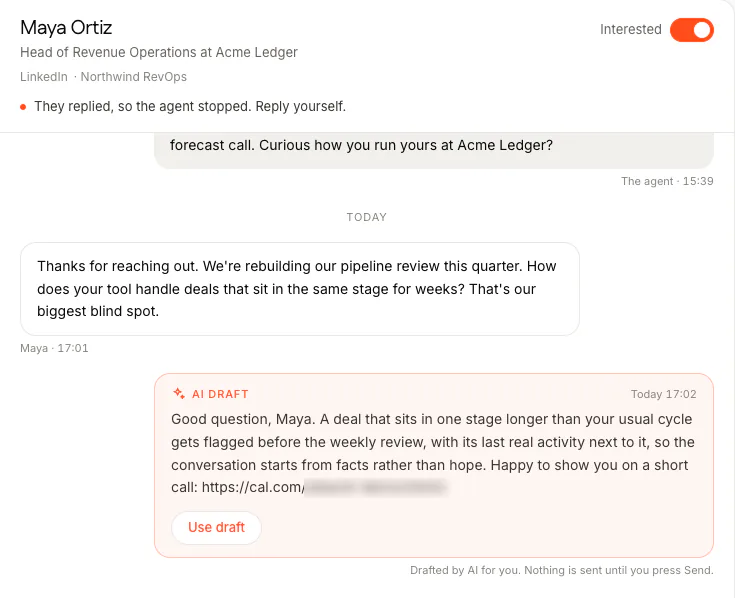
FOUND's drafts and its agent work to the same rule. Your booking link goes in only when they've shown real interest, by asking how it works, what it costs or whether it fits, or by saying let's talk, and only once per conversation. Neither invents a feature, a price, a customer or a number that isn't in your brief.
Rule 4: send a link, not "when suits you?"
A booking link lets them pick a slot that's really open, without three emails of back and forth. In FOUND, choose Book demos as your goal in Setup and add your booking link in Settings. Every message then aims for a short call, and with AI draft replies on, every interested reply gets a draft with your link. That's the BOOK card and the "They pick a time on your link" step on our home page.
FOUND never reads or writes your calendar, and its agent never proposes or accepts a specific time. If they suggest one, it answers with your link, or, when you haven't set one, hands the thread to you. The prospect picks the slot on your own booking tool.
Rule 5: hand back what only you can answer
Some questions need you: negotiating on price, contract terms, a security review, a customer they could talk to, a timeline. A confident wrong answer in your name costs more than a slow right one.
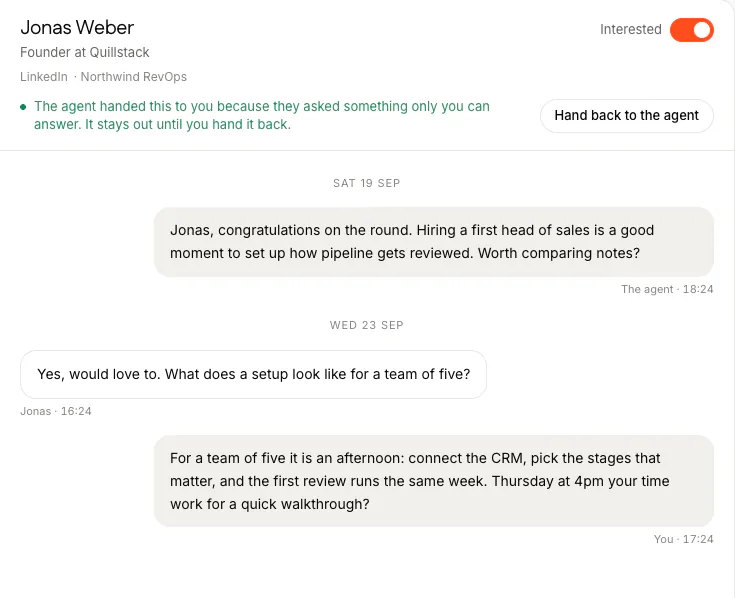
FOUND's agent hands those threads to you, with an email saying why, and cancels anything it had queued there. It does the same when someone sincerely asks whether they're talking to a bot: it never denies it and never claims to be human.
When to let the agent answer
Drafts cover most of it: you read, edit if you like, and press Send. If you're rarely at your desk when replies land, switch the agent on for the threads you choose. It's off by default, and here's what it does when it's on:
- It answers in your name, from your brief, in two or three short sentences.
- It waits before answering: at least five minutes on LinkedIn, longer on email, and only inside your sending hours. Every answer shows when it will go out, with a Don't send button until then.
- In review mode, its answers wait for your approval like everything else.
- The moment you reply yourself, the thread is yours and the agent stops writing on it.
- It lets them have the last word: no reply to "thanks" or "noted".
You can see the whole flow, from a reply to a hand-back, in the demo, or book 20 minutes with us there.
What you still do
Read the Interested threads once or twice a day. Press Send on the drafts you agree with, answer the threads the agent handed back, and take the calls. FOUND emails you when someone replies and when the agent hands a thread back, and can post each reply to Slack or send it to your own tools by webhook.
The prospect books on your own booking page, so the call lands in your calendar the way any booking does. The meetings themselves are counted on your calendar, not in FOUND.
Questions
Does FOUND book the meeting for me?
It gets the interested person to your booking link, through a draft you send or, on threads where you switch it on, the agent's own reply. The prospect picks a free slot on your own booking tool. FOUND never reads or writes your calendar.
Will the agent answer in the middle of the night?
No. Its LinkedIn answers go out inside your account's working hours and its email answers inside your mailbox's sending hours, each on their own clock.
What if they ask about price?
The agent hands pricing questions to you unless your own notes answer them, and then it quotes your notes exactly. A draft never makes up a number: if the answer isn't in your brief, it says you'll confirm.
Can I switch the agent on for every thread?
You switch it on thread by thread, so you decide which conversations it can answer. It's off by default, and replying yourself takes any thread back.