Trigify alternatives: 8 tools for buying signals after 22 October
Trigify's standalone platform is being retired as its team joins HubSpot. Here is what its own page says about the dates, what to save first, and eight tools to replace it, picked by the job you used it for.
On this page 15 sections
A signal tool earns its keep by telling you who is paying attention this week, so a first message has a reason behind it. If Trigify was that tool for you, the right replacement depends less on the signals than on what you did with the people they found.
So this page starts with what Trigify's own page says is happening and when, then a short list of what to save, then eight Trigify alternatives that watch for buying signals, each with the job it does best. We make one of them, so it is listed first and the disclosure sits right below.
The short answer
Trigify's page says access ends at 11:59pm BST on 22 October 2026 for customers on its standard notice period, and that accounts are not migrated to HubSpot.
Pick what comes next by the job you need done:
| If the job is | Look at |
|---|---|
| Signals turned straight into LinkedIn conversations, for one seller or a whole team | FOUND, or Valley |
| Engagement signals pooled across a whole team's profiles and company page | Teamfluence |
| First-party signals, such as website visits and product use, for a larger revenue team | Common Room |
| Enrichment tables you build yourself and sync to a CRM | Clay |
| Email-first sequences with an intent signals add-on | lemlist |
| A B2B database and email volume beside LinkedIn, with post signals | Skylead |
| Sequences that import a post's likers and commenters, or an event's attendees | La Growth Machine |
What is happening to Trigify
On 23 September 2026, Trigify announced that its team is joining HubSpot and that it is winding down the standalone Trigify platform. Its page thanks its customers, team, investors, partners and friends, and says it is contacting every customer individually and will support them through the transition.
- When access ends: at 11:59pm BST on 22 October 2026 (22:59 UTC) for most customers. Customers with different contractual notice periods receive their own dates directly.
- Until then: you can keep using Trigify during your notice period.
- What stops: integrations and API access, and monitoring and signal collection, when access ends.
- Your account: it is not migrated to HubSpot, and the Trigify product will not continue within HubSpot.
- Your data: retained or deleted under Trigify's contractual, privacy and legal obligations, and not used by HubSpot as part of the team's move.
- Your subscription: it does not renew beyond your service end date.
Source: trigify.io, read on 18 Oct 2026. We read it again after 22 October and update this page.
What to save before access ends
Trigify's FAQ asks customers to save what they want to keep before access ends, using the export options in Trigify, and to contact its team early if they need help getting their information.
Whichever tool you move to, these are worth having in a file of your own:
- Your lists. The people and companies you were working, with any note on why each one was there.
- What you watched. The keywords, competitors, experts and accounts you tracked. They are the setup you rebuild first.
- Who you already contacted, and when, so nobody gets a second first message from your new tool.
- Anything that depends on it. Webhooks, CRM fields and sheets fed by its integrations, so you can point them somewhere else before they stop.
Moving to FOUND? Import the people you were working as a CSV into Contacts and give the list to a campaign: the agent reads each person and writes to the ones who fit your buyer. Add the companies you already talk to, or their domains, to your block list in Contacts.
The 8 at a glance
What each one watches and its lowest price as its own pricing page showed it, in its own currency and billing period.
| Tool | What it watches | Lowest price shown |
|---|---|---|
| FOUND | Seven kinds of signal, from topics and competitors' company pages on LinkedIn to funding and job changes; profile viewers on a Premium or Sales Navigator account | $69 a month for one LinkedIn account, one mailbox and two agents |
| Teamfluence | Engagement with your team's profiles, posts and company page, plus competitors, influencers, keywords and ads | €449 a month, billed monthly, with unlimited seats |
| Valley | People engaging with your content, companies hiring, a competitor's audience, profile viewers | $199 a seat a month, or $149 a month billed quarterly |
| Common Room | Website activity, job changes, social and community engagement; product signals as an add-on | $2,500 a month billed annually, 5 seats included |
| Clay | Job changes, promotions, new hires, company news and social; web intent on Growth | Priced by actions and data credits, as shown on its pricing page |
| lemlist | Buying intent signals as an add-on, 100 signals a month | Multichannel, which adds LinkedIn: $109 a month for one user, or $87 billed yearly |
| Skylead | Post signals: the topics and problems people are talking about | $100 a seat a month |
| La Growth Machine | A post's likers and commenters and an event's attendees, imported on Pro | €60 a month per identity, or €50 on annual billing |
Who writes the messages, and who sends them on LinkedIn:
| Tool | Writes the messages | Sends on LinkedIn |
|---|---|---|
| FOUND | Yes, each one from the person's profile, the signal and your positioning | Yes, from your own account, paced, with review mode to approve first |
| Teamfluence | Not stated on the pages we checked; its AI qualifies and enriches leads | Connection requests across your team's accounts, with its networking add-on |
| Valley | Yes, in your voice, with drafts to review and approve | Yes, campaigns and follow-ups |
| Common Room | Yes, with RoomieAI Messages | Not stated on the pages we checked |
| Clay | Not stated on its pricing page; Claygent does the research | Not stated; email goes through its sequencer or an integration |
| lemlist | Yes, with its messaging AI agents | Yes, with LinkedIn automation on its Multichannel plan |
| Skylead | AI icebreakers; its AI SDR add-on writes outbound messages | Yes, beside email |
| La Growth Machine | AI writing assistant and AI voice messages | Yes, beside email and calls |
Looking wider than signal tools? The best LinkedIn prospecting tools groups 14 tools by the job each does, and social selling tools for LinkedIn picks 10 by how they start and keep conversations going.
FOUND
FOUND is an agent for anyone who sells to other businesses, from a founder selling alone to a full sales team with a seat for every rep. It watches LinkedIn for people showing need, checks everyone it finds against your buyer, and writes to the ones who fit from your own LinkedIn account and mailbox. Every lead carries the reason it is there.
- Signals
- Seven kinds: keyword engagement, people engaging with experts in your market, people interacting with a competitor's company page, people reacting to your posts or following you, people like your best customers, buying events (recent funding, job changes under 90 days, hiring momentum, the most active profiles in your buyer) and companies using a tool. On a Premium or Sales Navigator account, people who viewed your profile too, read once a day.
- Writing
- Each message is built from the person's profile, the signal that found them and your positioning, in your tone. On a LinkedIn Premium account, each invitation carries a short personal note written from what the person did.
- Replies
- One inbox for LinkedIn and email. With AI draft replies on, an answer waits with each reply. On the threads you switch it on for, the agent answers by your campaign's reply rules and offers your meeting link once they show interest.
- Price
- $69 a month for two agents, one LinkedIn account and one mailbox. A teammate is $59 a month and an extra agent $39. You see real leads for your own buyer before you pay anything.
- Pick it if
- you mainly want signals, including people engaging with your competitors' company pages, turned into a written first message and sent from your own LinkedIn, without building the workflow yourself.
Teamfluence
Teamfluence collects likes, comments, visits and other signals from people engaging with your team and company, checks each person against your ICP with AI, enriches them and sends them to the tools you use.
- Signals
- Profile visits on your teammates' profiles and your company page; likes, comments, shares, follows and new connections; tracked competitor posts, influencer activity, keywords and ads.
- Outreach
- Workflows that push leads to your CRM, a webhook, Slack or a CSV. A networking add-on spreads connection requests across your team's accounts. Native HubSpot and Salesforce.
- Price shown
- €449 a month, billed monthly: unlimited seats, 1,000 qualified leads a month and 20,000 credits. There is no self-service sign-up; every customer starts with a call and a guided onboarding.
- Trigify customers
- It offers price matching and a free migration service.
- Pick it if
- you mainly want engagement signals pooled across every teammate's profile and your company page, pushed into HubSpot or Salesforce, with onboarding done with you.
Valley
Valley finds prospects, researches what matters to each one, writes messages in your voice and runs outreach on LinkedIn, with email on its higher plans or as an add-on.
- Signals
- Plays for people engaging with your content, companies hiring, a competitor's audience or your own list; profile viewers with LinkedIn Premium.
- Outreach
- LinkedIn campaigns and follow-ups. You review, edit and approve drafts before they go out, and replies land in a unified inbox with the next one ready to review.
- Price shown
- Starter, LinkedIn only: $199 a seat a month billed monthly, or $149 a month billed quarterly ($447 every three months). Plus, with 1,000 emails a month: $299, or $249 billed quarterly. A 7-day trial with a payment method.
- Connects to
- HubSpot, Claude and ChatGPT through MCP, an API and webhooks.
- Pick it if
- you mainly want signal-based LinkedIn outreach with a native HubSpot connection, and a plan that includes email, onboarding and a customer success manager.
Common Room
Common Room is a buyer intelligence platform for revenue teams, with AI for research, messages and prospecting.
- Signals
- Website activity and de-anonymisation, job changes, social and community engagement, company intent topics, and product signals as an add-on.
- Outreach
- RoomieAI Messages and Prospector credits. LinkedIn sending is not stated on the pages we checked.
- Price shown
- Essential: $2,500 a month billed annually, with 5 seats and up to 100,000 contacts. Advanced and Enterprise are custom. Each plan starts with a demo request.
- Pick it if
- you mainly want first-party signals, such as who visits your website and who uses your product, across a larger revenue team.
Clay
Clay is a data enrichment and research workspace: you build tables, enrich them from many data providers and research with Claygent, its AI agent with web access.
- Signals
- On Launch: job changes, promotions, new hires, company news and social. Growth adds web intent signals and any signal through a webhook.
- Outreach
- Email through Clay's sequencer or a sequencing integration. LinkedIn sending is not stated on its pricing page.
- Price shown
- A free plan, then Launch, Growth and Enterprise, priced by the actions and data credits you pick, as shown on its pricing page. A 14-day trial.
- Pick it if
- you mainly want to build your own enrichment and signal workflows from many data providers, with CRM sync on Growth.
lemlist
lemlist runs email, LinkedIn, calls, WhatsApp and SMS from one sequence, with a database of more than 600 million leads.
- Signals
- A buying intent signals add-on: real-time updates when a lead does something that signals interest, 100 signals a month, with intent signal agents that suggest and track those events.
- Outreach
- LinkedIn automation beside email on Multichannel. Its feature list includes LinkedIn invites, messages, profile visits, voice messages and InMail, and a unified inbox.
- Price shown
- Multichannel: $109 a month for one user on monthly billing, or $87 a month on yearly. The signals add-on: $29 a month, or $21 on yearly. A 14-day trial.
- Pick it if
- you mainly want email at volume and a large lead database, with LinkedIn and other channels in the same sequence.
Skylead
Skylead runs LinkedIn automation and cold email together, with a B2B database and smart sequences.
- Signals
- Post signals: leads found by the topics and problems they are actively talking about.
- Outreach
- LinkedIn and email in one sequence, with unlimited email accounts and 100,000 emails a month. Its AI SDR add-on writes outbound messages and suggested replies, and sends replies at once in automatic mode or after your review in semi-automatic mode.
- Price shown
- All-in-one: $100 a seat a month. Agency: $999 a month for 25 seats as a first-year promotion. A 7-day trial.
- Pick it if
- you mainly want a built-in B2B database and high email volume beside LinkedIn, with post signals in the same tool.
La Growth Machine
La Growth Machine runs multichannel sequences across LinkedIn, email and calls, with X on its Ultimate plan.
- Signals
- On Pro, imports of LinkedIn intent data: a post's likers and commenters, and an event's attendees. Lookalike opportunities add more leads like each positive reply.
- Outreach
- LinkedIn, email and calls, with an AI writing assistant and AI-generated voice messages; one inbox for LinkedIn and email on Pro.
- Price shown
- Basic: €60 a month per identity on monthly billing, or €50 on annual. Pro: €120, or €100 on annual. An identity is a profile that runs campaigns. A 14-day trial.
- Pick it if
- you mainly want LinkedIn, email and calls in one sequence, with voice messages and imports of the people who engaged with a post or an event.
Rebuild your Trigify signals in FOUND
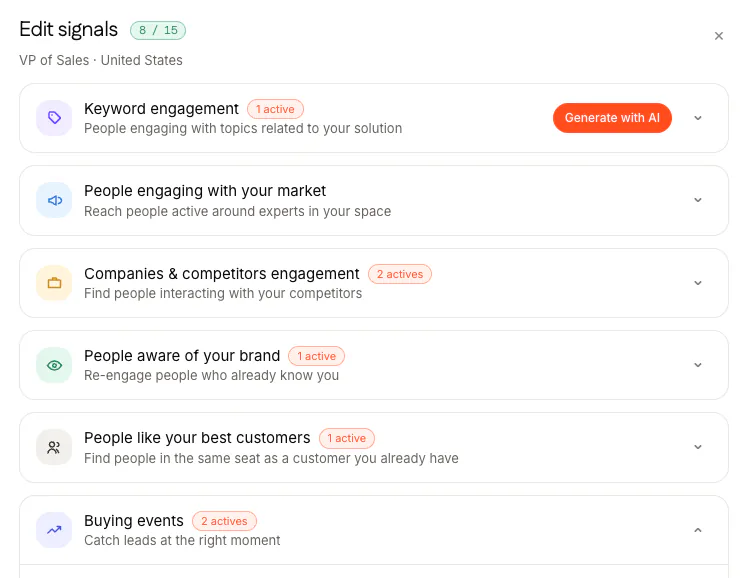
Most signal setups come down to the same handful of things to watch. Here is where each one lives in FOUND, under Agent, Sources, Edit signals.
| If you watched | In FOUND |
|---|---|
| Keywords and topics | Keyword engagement: people engaging with posts on topics related to what you sell |
| Competitors | Companies and competitors engagement: people interacting with a competitor's company page |
| Experts and voices in your market | People engaging with your market: paste an expert's profile and the agent watches who engages with their posts |
| Your own posts and followers | People aware of your brand: people reacting to what you post, and people who start following you |
| Job changes, funding and hiring | Buying events: recent job changes (under 90 days), companies that raised money recently, hiring momentum, and the top 5% most active profiles in your buyer |
| People who viewed your profile | Their own row on Sources, read once a day, on a Premium or Sales Navigator account |
| Accounts like your best customers | People like your best customers: paste a customer's profile and the agent finds people in the same seat |
| The tools a company uses | Companies using a tool |
An agent takes at least four signals and up to fifteen, and every person a signal surfaces is checked against your buyer before they become a lead. What each signal catches, and the first line written for it, is in LinkedIn buying signals; how the check against your buyer works is in LinkedIn lead scoring; and the screens are in How signals work.
How we checked
We read each vendor's own website on 18 Oct 2026: its pricing page, its home page and, where a fact came from there, its FAQ. Prices are copied as shown, in the vendor's own currency, and where a pricing page has a billing switch we say which billing the price belongs to. For FOUND we used our own site and product.
We didn't run these tools side by side, so nothing here claims a reply rate or a lead count for any of them. Spotted something out of date? Write to hello@foundtofind.com.
- Trigify: trigify.io
- Teamfluence: teamfluence.com and its pricing page
- Valley: joinvalley.co and its pricing page
- Common Room: commonroom.io pricing
- Clay: clay.com pricing
- lemlist: lemlist.com and its pricing page
- Skylead: skylead.io pricing and its AI SDR page
- La Growth Machine: lagrowthmachine.com pricing
Questions
Is Trigify shutting down?
Its team is joining HubSpot and the standalone Trigify platform is being retired, according to Trigify's own page. For customers on its standard notice period, access ends at 11:59pm BST on 22 October 2026.
When does Trigify access end?
At 11:59pm BST on 22 October 2026, which is 22:59 UTC, for customers on its standard notice period. Customers with a different contractual notice period receive their dates from Trigify directly. Integrations, API access, monitoring and signal collection stop at the same time.
Does my Trigify account move to HubSpot?
No. Trigify's FAQ says the platform, customer accounts and service will not continue within HubSpot, and accounts will not be migrated. Save what you want to keep before access ends.
What is the closest Trigify alternative for a small team?
It depends on what you did with the signals. If you watched engagement and then wrote to people on LinkedIn yourself, FOUND runs that loop for one seller or a whole team, at $69 a month: it finds the people, checks them against your buyer and writes the first message. If you want signals pooled across a whole team's profiles, Teamfluence offers Trigify customers price matching and a free migration service.
Can FOUND see who engages with a competitor's LinkedIn page?
Yes. The companies and competitors engagement signal watches people interacting with a competitor's company page. Type the competitor's name and pick the right company; everyone it finds is checked against your buyer before they become a lead.