LinkedIn Sales Navigator vs Premium: Core, Business and Career compared
LinkedIn sells Sales Navigator to sellers and Premium Business and Premium Career to everyone else and every Sales Navigator plan includes Premium Business's features. Here is what each plan gives you for search, InMail and alerts, what it costs and which one fits the way you sell.
On this page 8 sections
Quick answer: Pick Sales Navigator Core, at US$119.99 a month, if you prospect on LinkedIn every week and want 50+ sales search filters, lead lists, alerts and 50 InMail credits a month; it includes Premium Business's features too. Pick Premium Business, at US$69.99 a month, if selling is part of your week and you mainly want search without the basic account's cap, 15 InMails and a stronger profile and leave Premium Career, at US$39.99, to job seekers.
Premium and Sales Navigator are separate subscriptions on the same LinkedIn profile. Premium Career and Premium Business change LinkedIn as you already use it; Sales Navigator adds a separate tool for sellers, with its own search, lists and inbox.
Below are the three plans side by side as LinkedIn's own pages describe them on 25 Oct 2026, what each is built for, the differences that decide it and a verdict for each kind of seller.
Sales Navigator vs Premium at a glance
| Feature | Sales Navigator Core | Premium Business | Premium Career |
|---|---|---|---|
| Billed monthly | US$119.99 a month | US$69.99 a month | US$39.99 a month |
| Billed yearly | US$1,079.88 a year | US$539.88 a year | US$239.88 a year |
| InMail credits | 50 a month, up to 150 banked | 15 a month, up to 45 banked | 5 a month, up to 15 banked |
| How you find people | Lead and company search with 50+ sales filters, lead recommendations and saved leads | Unlimited people and company search, with what LinkedIn calls limited sales filters | Job search filters and search for people hiring for the role you want |
| Lists and alerts | Custom lead and account lists; alerts on job changes and new posts | Not listed for this plan | Not listed for this plan |
| Research and insights | Account IQ and Lead IQ summaries; Relationship Explorer and Relationship Map | Business insights on companies, such as growth trends and hiring activity | AI insights on job posts |
| AI writing | Message Assist, plus Premium Business's writing help | AI message drafts and profile writing help | A message proofreader and profile writing help |
| Who viewed your profile | The past 365 days | The past 365 days | The past 365 days |
| Where you work | Its own Sales Navigator interface | LinkedIn as usual | LinkedIn as usual |
| Best for, per LinkedIn | Individual sellers | Business leaders and owners building their brand and network | Job seekers and career accelerators |
One line explains most of the table: LinkedIn includes Premium Business's features in every Sales Navigator plan. So Core is Premium Business plus a sales tool, for US$50 a month more on monthly billing (our arithmetic).
The differences that decide it
Search: a sharper search or just more of it
On a basic account, heavy searching runs into LinkedIn's commercial use limit, which resets on the first of each month. LinkedIn names Premium Business, Recruiter Lite and Sales Navigator as the plans that raise it; Premium Career is not on that list.
Premium Business searches people and companies with no limit, using what LinkedIn's comparison calls limited sales filters. Sales Navigator's search has more than 50 filters built for prospecting and anyone you find can go into a lead list that alerts you when they change jobs or post.
InMail: 50, 15 or 5 credits a month
Sales Navigator gives 50 InMail credits a month on every tier, renewed on the first of the month, banking up to 150 and each must be used within 90 days. Premium Business gives 15 and Premium Career 5, renewed on your billing date, banking up to 45 and 15. On both, a credit comes back when the person responds within 90 days, even with a decline. Neither sells extra credits and Premium credits can't be spent in Sales Navigator.
Fifty credits come to roughly a dozen a week, so InMail stays a tool for the few people outside your network who matter most. How to write one worth its credit is in what InMail is.
Signals: alerts on people or insights on companies
Sales Navigator watches the people you save, with alerts when they change jobs or post and Account IQ and Lead IQ sum up a company or a person before you write. Premium Business gives you insights on companies, such as growth and hiring. All three plans show who viewed your profile over the past 365 days.
Price: what the extra US$50 buys
On monthly billing, Sales Navigator Core costs US$50 a month more than Premium Business and US$80 more than Premium Career. Billed yearly, the three come to US$89.99, US$44.99 and US$19.99 a month and LinkedIn puts the yearly saving at 25%, 36% and 50%. The differences and monthly figures are our arithmetic.
Because Core includes Premium Business's features, that US$50 buys the sales tools on top: the filters, the lists and alerts, the AI research and 35 more InMail credits a month. There is no reason to pay for both.
Where you work
Premium changes LinkedIn itself: your profile, your search, your messages. Sales Navigator adds a second place to work, with its own search, lists and inbox. That pays off if you prospect most days and is one more tab to keep up with if you don't.
Which one to pick
Pick Sales Navigator Core if you mainly want
- To prospect on LinkedIn every week, with more than 50 sales filters and saved lists.
- Alerts when the people you track change jobs or post.
- AI research on accounts and leads before you write, from Account IQ and Lead IQ.
- 50 InMail credits a month, banking up to 150.
- Premium Business's features in the same subscription.
Pick Premium Business if you mainly want
- Search without the basic account's monthly cap, at US$69.99 a month.
- 15 InMail credits a month for the few people outside your network.
- A custom button and a Featured section that help buyers who find you take the next step.
- Company insights such as growth and hiring, while selling is part of your week.
Premium Career fits a job search. For selling, it still lets you add a note to every invitation and see a year of profile viewers, but it is not among the plans LinkedIn lists as raising the search limit.
A third option: have the buyers found for you
All three plans make LinkedIn easier to work by hand: you still search, decide who to write to and write each message. If you would rather start from people already showing need, FOUND is an AI SDR for LinkedIn that works on the account you have, basic or Premium, with no Sales Navigator seat.
It watches buying signals every day, such as people posting about the problem you solve, engaging with a competitor's posts, starting a new role or at a company hiring the team you sell to or fresh from a raise, from up to 15 signals per agent. It checks each person against your buyer twice, the headline first and then the full profile and finds their verified work email. Then it writes the connection note on a Premium account, every message after it and emails from your own mailbox, all in one sequence sent from your own account at a human pace, with review mode holding everything for your approval. Replies from both land in one inbox, where an agent can answer them and offer your meeting link.
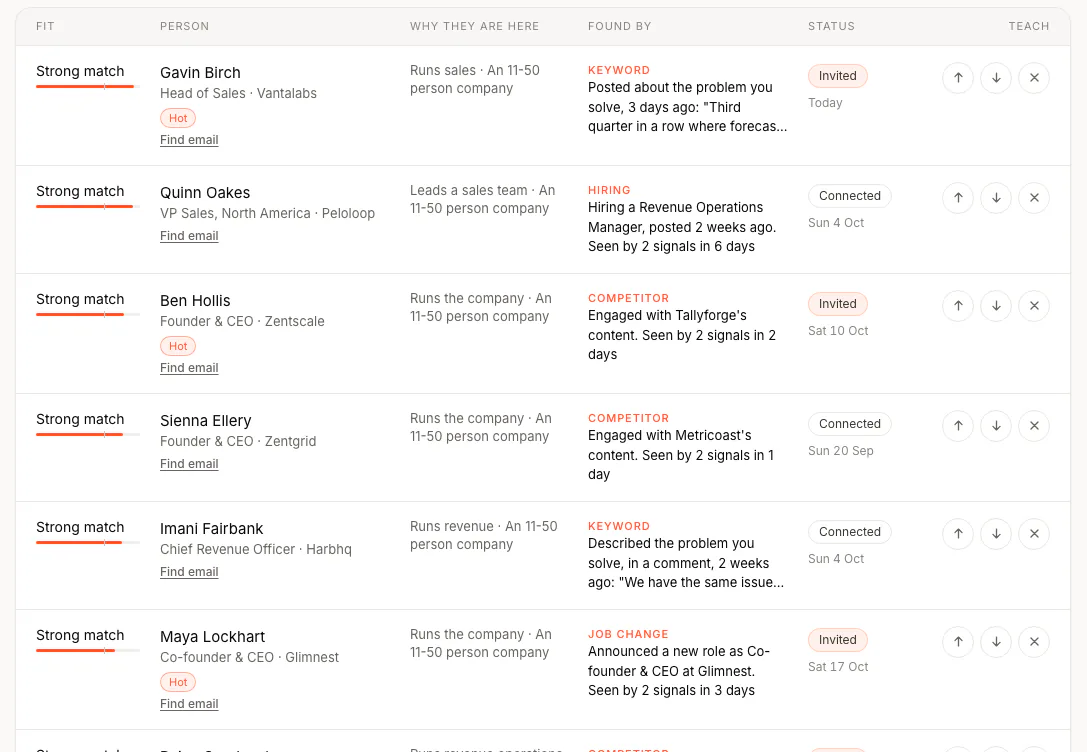
It costs $69 a month for two agents, one LinkedIn account, one mailbox and 100 credits, on top of any LinkedIn plan you keep. Seats and extra agents are on the pricing page and you see your first real leads before you pay.
Questions
Is Sales Navigator better than LinkedIn Premium?
For prospecting, yes: it adds more than 50 sales search filters, lead and account lists, alerts on saved leads, Account IQ and Lead IQ and 50 InMail credits a month and it includes Premium Business's features. If selling is only part of your week, Premium Business costs US$50 a month less.
Does Sales Navigator include LinkedIn Premium?
Yes. LinkedIn says every Sales Navigator plan includes Premium Business's features, so you don't need a separate Premium subscription.
Which has more InMail credits, Sales Navigator or Premium?
Sales Navigator, with 50 a month on every tier. Premium Business gives 15 and Premium Career 5 and unused credits bank up to 150, 45 and 15.
How much is Sales Navigator compared with Premium?
Sales Navigator Core is US$119.99 a month or US$1,079.88 a year. Premium Business is US$69.99 a month or US$539.88 a year and Premium Career US$39.99 a month or US$239.88 a year, as LinkedIn listed them on 25 Oct 2026.
Can I switch from Premium to Sales Navigator?
Yes. LinkedIn says eligible subscribers can switch plans, sometimes by cancelling the current one first and InMail credits don't carry over. Moving from Sales Navigator back to Premium removes Sales Navigator's own features, such as its search and alerts.
Do I need Sales Navigator to use FOUND?
No. FOUND finds people from buying signals and sends from the LinkedIn account you already have; on a Premium account it also writes a note for each invitation. It costs $69 a month for two agents, one LinkedIn account, one mailbox and 100 credits.
How we checked
We read each LinkedIn page below on 25 Oct 2026 and took every price and feature from it, in US dollars for one license. LinkedIn dates its Sales Navigator pricing to 27 Sep 2026 and its Premium pricing to 20 Apr 2026. Where its pages disagree, we followed its comparison tables: Premium Business's own FAQ mentions 90 days of profile viewers, while LinkedIn's comparisons give 365.
The differences and monthly figures are our arithmetic and FOUND's side comes from our own product. We make no claim about results on any LinkedIn plan.
- LinkedIn Sales Solutions: Sales Navigator plans and pricing and Sales Navigator vs. Premium
- LinkedIn Premium: Premium Business and Premium Career
- LinkedIn Help: Difference between basic and Premium accounts, InMail message credits and renewal, InMail credits in Sales Navigator, Commercial use limit and Personalize invitations to connect
Spotted something out of date? Write to hello@foundtofind.com and we will correct it and change the date at the top.